

Fake Waterfall Plot


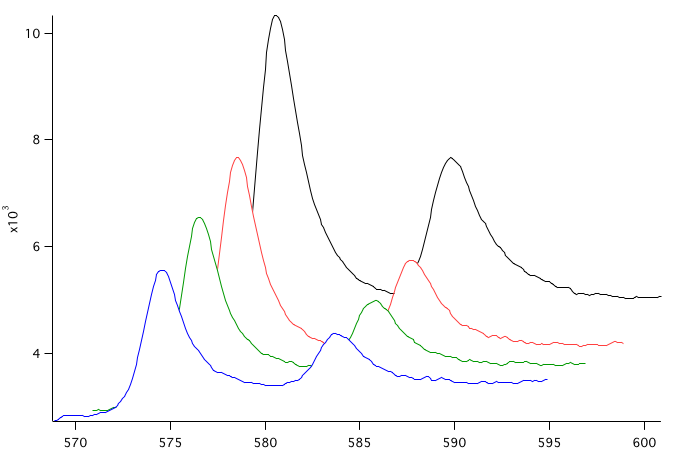
// Igor can display waterfall plots using the NewWaterfall operation (choose Windows->New->Packages->Waterfall Plot).
// This requires storing your data in a 2D wave. You can also create a 3D waterfall plot using Gizmo.
//
// However, for the common case of displaying a series of spectra, you may find that a "fake waterfall plot"
// is more convenient. And it works with your original waveform or XY data.
//
// A fake waterfall plot is a regular graph with multiple waveform or XY traces where you use Igor's X and Y
// trace display offset feature to create the waterfall effect. This is simple and also gives you a regular
// Igor graph with regular traces that you can format and annotate using familiar techniques.
//
// Here is a procedure for converting a regular graph with multiple waveform or XY traces into a fake waterfall plot.
// The ApplyFakeWaterfall function converts a regular graph to a fake waterfall plot.
// The RemoveFakeWaterfall function converts it back to a regular graph.
//
// The attached experiment file contains these procedures along with sample data and a sample graph.

Function ApplyFakeWaterfall(graphName, dx, dy, hidden)		// e.g., ApplyFakeWaterfall("Graph0", 2, 100, 1)
	String graphName	// Name of graph or "" for top graph
	Variable dx, dy		// Used to offset traces to create waterfall effect
	Variable hidden		// If true, apply hidden line removal

	String traceList = TraceNameList(graphName, ";", 1)
	Variable numberOfTraces = ItemsInLIst(traceList)

	Variable traceNumber
	for(traceNumber=0; traceNumber<numberOfTraces; traceNumber+=1)
		String trace = StringFromList(traceNumber, traceList)
		Variable offsetX = (numberOfTraces-traceNumber-1) * dx
		Variable offsetY = (numberOfTraces-traceNumber-1) * dy
		ModifyGraph/W=$graphName offset($trace)={offsetX,offsetY}
		ModifyGraph/W=$graphName plusRGB($trace)=(65535,65535,65535)	// Fill color is white
		if (hidden)
			ModifyGraph/W=$graphName mode($trace)=7, hbFill($trace)=1		// Fill to zero, erase mode
		else
			ModifyGraph/W=$graphName mode($trace)=0						// Lines between points
		endif
	endfor
End

Function RemoveFakeWaterfall(graphName)		// e.g., RemoveFakeWaterfall("Graph0")
	String graphName	// Name of graph or "" for top graph

	String traceList = TraceNameList(graphName, ";", 1)
	Variable numberOfTraces = ItemsInLIst(traceList)

	Variable traceNumber
	for(traceNumber=0; traceNumber<numberOfTraces; traceNumber+=1)
		String trace = StringFromList(traceNumber, traceList)
		ModifyGraph/W=$graphName offset($trace)={0,0}
		ModifyGraph/W=$graphName plusRGB($trace)=(65535,65535,65535)	// Fill color is white
		ModifyGraph/W=$graphName mode($trace)=0							// Lines between points
	endfor
End

Forum

Support

Gallery
Igor Pro 10
Learn More
Igor XOP Toolkit
Learn More
Igor NIDAQ Tools MX
Learn More