

Putting pixel values on an image
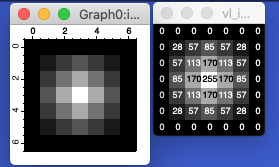
I wrote this snippet to generate images for teaching. I wanted to show the effect of matrix convolution on images. To understand this, it helps to see the pixel values before and after convolution.
// This procedure will take an image and make a new image with the pixel values overlaid.
// It offers the result to be saved as a PDF.
// It is intended for small grayscale images.

///	@param	m0	2D matrix (image) to be represented as pixel values
Function SavePixelValue(m0)
	Wave m0
	// check input wave
	if(DimSize(m0,2) > 1 || DimSize(m0,3) > 1)
		DoAlert 0, "Grayscale images only."
		return -1
	elseif(WaveType(m0) != 72)
		DoAlert 0, "8-bit images only."
		return -1
	endif

	Variable matsize = numpnts(m0)
	Duplicate/O m0, pixelValImg,pixelValWave
	String ValWinName = "vl_" + NameOfWave(m0)
	KillWindow/Z $ValWinName
	NewImage/N=$ValWinName/S=0 m0
	String m0Name = NameOfWave(m0)

	String textName,labelValStr
	Redimension/N=(matsize) pixelValWave
	Variable offset = x2pnt(m0, 0)

	Variable i

	for(i = 0; i < matsize; i += 1)
		textName = "text" + num2str(i)
		labelValStr = num2str(pixelValWave[i])
		//Tag/C/N=$textName/F=0/B=1/X=0.00/Y=0.00/L=0/W=$ImgWinName PixelValImg, i-offset, labelValStr
		if(pixelValWave[i] > (wavemin(m0) + round(0.5 * (wavemax(m0) - wavemin(m0)))))
			Tag/C/N=$textName/F=0/B=1/X=0.00/Y=0.00/L=0/W=$ValWinName $m0Name, i-offset, labelValStr
		else
			Tag/C/N=$textName/F=0/B=1/X=0.00/Y=0.00/L=0/W=$ValWinName/G=(65535,65535,65535) $m0Name, i-offset, labelValStr
		endif
	endfor
	String fileName = NameOfWave(m0) + ".pdf"
	SavePICT/E=-2 as fileName
End

Forum

Support

Gallery
Igor Pro 10
Learn More
Igor XOP Toolkit
Learn More
Igor NIDAQ Tools MX
Learn More