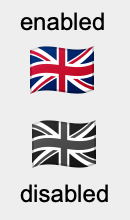
Igor buttons may be drawn using a named picture instead of text. That's pretty nice.
But the help for Button states
<blockquote>The picture is taken to be three side-by-side frames that show the control appearance in the normal state, when the mouse is down, and in the disabled state.</blockquote>
There seems to be no built-in support to generate such three-frame pictures. I'd like to share here a function I have just written that produces the three side-by-side images from a single PNG image. As written, the function expects flags as pictures, but it should be easily adapted to other use cases.
Here's what I did to get buttons showing national flags:
1. Download some flag PNGs from the internet -- I used Flagpedia.net at https://flagpedia.net/download/icons . A single small download put flags of all over the world in my downloads folder:
strconstant ksDownloads= "Macintosh HD:Users:wolfgang:Downloads:64x48:"
2. After some coding, all I need is now to call the function given below, e.g ImportFlag("gb", 2).
3. I can then use my new flag like so: NewPanel
Button b0, title= "", picture= gb_flag
And here's the function...have fun!
strconstant ksDownloads= "Macintosh HD:Users:wolfgang:Downloads:64x48:"
function ImportFlag(ccode, shift)
string ccode // international country code
variable shift. // shift in pixel for the "pressed" button
NewPath /O/Q flagPath, ksDownloads
string inFileName= ccode + ".png"
string flagWaveName= "flagWave_" + ccode
ImageLoad /P=flagPath /Q /T=png /N=$flagWaveName inFileName
wave flag= $flagWaveName
variable width= DimSize(flag, 0) + shift, w2= 2*width
variable height= DimSize(flag, 1) + shift
variable colors= DimSize(flag, 2)
Redimension /N=(3*width, height, -1) flag
// the first third is left untouched; it is thus LT aligned
// the second third is a copy of the first, but shifted right and down
flag[width+shift,w2-1][shift,height-1][]= flag[p-width-shift][q-shift][r]
// the last third is copied unshifted from the first, but gray-scaled using
// the RGB-YIQ transform(R,G,B): Y = 0.299*R + 0.587*G + 0.114*B
variable yR= 0.299, yG= 0.587, yB= 0.114
flag[w2,3*width-1][][0,2]= flag[p-w2][q][0]*yR + flag[p-w2][q][1]*yG + flag[p-w2][q][2]*yB
if( colors == 4 ) // the A channel (opacity) must be preserved
flag[w2,3*width-1][][3]= flag[p-w2][q][r]
endif
string outFileName= ccode + ".igor.png"
string pictName= ccode + "_flag"
ImageSave /O /P=flagPath /T="png" $flagWaveName as outFileName
KillWaves flag
LoadPICT /O /P=flagPath /Q outFileName, $pictName
end