

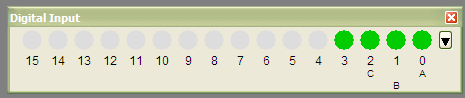
Create a panel representing equipment status


To use the code, copy it into a procedure window and compile the code. Then, you'll need to create two waves.
The first wave is named
gwDigitalInputChan0. The code gets the name of each channel from the row dimension labels of this wave. For example:
Make/O/N=16 gwDigitalInputChan0
SetDimLabel 0, 0, A, gwDigitalInputChan0
SetDimLabel 0, 1, B, gwDigitalInputChan0
SetDimLabel 0, 2, C, gwDigitalInputChan0
The second wave,
wSwitches0 represents the status of each bit (on or off). Changing values in this wave will change the fill color of the corresponding circle on the control panel. If the panel is set to be in control mode, then pressing one of the colored "buttons" on the control panel will toggle the value of the corresponding point in the wave. For example:
Make/o/n=16 wSwitches0
wSwitches0[0,3] = 1
Now, after you have executed the code above, you can build the panel. Do this by executing the following command at the Igor command line:
BuildDigInputPanel("test", 4, channelNum = 0)
#pragma rtGlobals=1		// Use modern global access method.

Function pnlDigitalInput0()
	DoWindow/F pnlDigitalInputChan0
	if (!V_flag)
		// TODO:  Retrieve the type of panel to get from settings
		Variable x0, y0

		BuildDigInputPanel("pnlDigitalInputChan0", 4, channelNum = 0)
	endif
End

Function DigInputButtonPress(s)
	STRUCT WMWinHookStruct &s

	switch (s.eventCode)
		Case 3:		// mouse down
			String buttonPressed = ""
			Variable buttonFound
			buttonFound = FindControl(s, buttonPressed)
			// Change the color and frame of the button to make
			// it looked like it has been toggled.
			if (buttonFound)
				ControlInfo/W=$(s.winName) $(buttonPressed)
				if (V_flag == 4)		// Make sure this control is a ValDisplay
					Variable buttonValue
					if (ValDisplay_getValue(s.winName, buttonPressed, buttonValue))
						if (buttonValue)
							// Button has been clicked, so change frame to indented.
							ValDisplay $(buttonPressed) win=$(s.winName), frame = 4
						else
							// Button has been unclicked, so change frame to raised.
							ValDisplay $(buttonPressed) win=$(s.winName), frame = 1
						endif
						buttonValue = !(buttonValue)
						ValDisplay_setValue(s.winName, buttonPressed, buttonValue)
						return 1
					endif
				endif
			endif
			break
	EndSwitch
	return 0
End

//**
// Determines if the mouse cursor is currently over a control
// and provides the name of the control.
//
// @param s
// 	This is an instance of the WMWinHookStruct structure which
// 	is the structured that is passed to a named window hook function.
// @param controlName
// 	Name of control the the mouse cursor is currently over.  This is
// 	the output parameter of this function.
// @param controlType
// 	[OPTIONAL]  If provided, only controls of this type will be considered.
// 	For a list of types and their meanings, look at the ControlInfo
// 	command help and look at the V_flag parameter set for each control type.
// 	By default, the type of a control is ignored.
// @param excludedState
// 	[OPTIONAL] If non-zero, controls will be considered from consideration
// 	if they are disabled and/or hidden.  Use the following values to exclude
// 	controls in the following states:
// 		Value			State
// 		1				Hidden
// 		2				Disabled (but visible)
// 		3				Hidden OR Disabled (but visible)
// 	By default, the disable state of a control is ignored.
//
// @return
// 	If a control was found meeting the criteria specified in the parameters,
// 	the function will return 1.  If no control is found, 0 will be returned.
//*
Function FindControl(s, controlName, [controlType, excludedState])
	STRUCT WMWinHookStruct &s
	String &controlName
	Variable controlType
	Variable excludedState

	Variable controlFound
	controlName = ""

	if (ParamIsDefault(controlType))
		// Match all types of controls
		controlType = 0
	endif

	String controlList = ControlNameList(s.winName, ";", "*")
	Variable numControls = ItemsInList(controlList, ";")
	String currentControlName
	Variable n
	For (n=0; n<numControls; n+=1)
		currentControlName = StringFromList(n, controlList, ";")
		ControlInfo/W=$(s.winName) $(currentControlName)

		// Exclude this control if only controls of a certain type should
		// be considered.
		if (controlType != 0 && controlType != V_flag)
			continue
		endif

		// Possibly exclude this control if it is hidden or disabled
		if (V_disable != 0)
			if (V_disable & excludedState)
				continue
			endif
		endif

		// Determine if this control was clicked on.
		Variable controlClicked
		controlClicked = DoesCursorOverlap(s, V_height, V_width, V_top, V_left)
		if (controlClicked)
			controlName = currentControlName
			controlFound = 1
		endif
	EndFor

	return controlFound
End

//**
// Determines if the current mouse position falls within a certain boundary.
//
// @param s
// 	This is an instance of the WMWinHookStruct structure which
// 	is the structured that is passed to a named window hook function.
// @param V_height
// 	Height of target area, in pixels.
// @param V_width
// 	Width of target area, in pixels.
// @param V_top
// 	Top of target area, in pixels.
// @param V_left
// 	Left of target area, in pixels.
//
// @return
// 	If the mouse cursor overlaps the target area, 1 is returned.  Otherwise, 0 is returned.
//*
Function DoesCursorOverlap(s, V_height, V_width, V_top, V_left)
	STRUCT WMWinHookStruct &s
	Variable V_height
	Variable V_width
	Variable V_top
	Variable V_left

	// Check vertical location
	if (s.mouseLoc.v >= V_top && s.mouseLoc.v <= V_top + V_height)
		// Check horizontal location
		if (s.mouseLoc.h >= V_left && s.mouseLoc.h <= V_left + V_width)
			return 1
		endif
	endif
	return 0
End

//**
// Get the value currently displayed in a ValDisplay control.
//
// @param win
// 	Name of window with control.
// @param ctrlName
// 	Name of ValDisplay control.
// @param valueVar
// 	Variable passed by reference where the value will be stored.
//
// @return
// 	0 if there was an error or 1 if there was no error.
//*
Function ValDisplay_getValue(win, ctrlName, valueVar)
	String win
	String ctrlName
	Variable &valueVar

	ControlInfo/W=$(win) $(ctrlName)
	if (WinType(win) != 0 && abs(V_flag) != 4)		// Make sure this control is a ValDisplay
		return 0		// Error
	else
		valueVar = V_value
		return 1		// Success
	endif
End

//**
// Sets the value currently displayed in a ValDisplay control by
// writing that value to the point in the wave attached to the ValDisplay
// control.  Obviously this assumes that the ValDisplay control is
// associated with a wave and not a variable.
//
// @param win
// 	Name of window with control.
// @param ctrlName
// 	Name of ValDisplay control.
// @param valueVar
// 	Variable passed by reference containing the value that should be
// 	set in whatever point in whatever wave controls the ValDisplay control..
//
// @return
// 	0 if there was an error or 1 if there was no error.
//*
Function ValDisplay_setValue(win, ctrlName, valueVar)
	String win
	String ctrlName
	Variable &valueVar

	Variable result
	String currentDF = GetDataFolder(1)
	SetDataFolder root:

	ControlInfo/W=$(win) $(ctrlName)
	String source = S_value
	if (WinType(win) != 0 && V_flag != 4)		// Make sure this control is a ValDisplay
		result = 0		// Error
	else
		// Get the name of the wave and point of wave controlling
		// the value displayed in this control.
		String wName, rowString, colString
		Variable rowNum = NaN, colNum = NaN
		String regExp = "([[:alnum:]:_]+)\[([%[:alnum:]_%]+)\](?:\[([%[:alnum:]_%]+)\])?"
		SplitString/E=regExp source, wName, rowString, colString
		if (V_flag >= 2)
			WAVE/Z controllingWave = $(wName)
			if (WaveExists(controllingWave))
				if (V_flag >= 3)
					// Determine what column number to use.
					if (numtype(str2num(colString)) == 0)
						colNum = str2num(colString)
					else
						colNum = FindDimLabel(controllingWave, 0, colString[1, strlen(colString) - 1])
					endif
				endif
				// Determine what row number to use.
				if (numtype(str2num(rowString)) == 0)
					rowNum = str2num(rowString)
				else
					rowNum = FindDimLabel(controllingWave, 0, rowString[1, strlen(rowString) - 1])
				endif

				// Set the value of the wave to the specified value.
				if (numtype(colNum) != 0 && rowNum >= 0)
					// Only use a row number.
					controllingWave[rowNum] = valueVar
					result = 1
				elseif (numtype(colNum) == 0 && colNum >= 0)
					// Use a row and a column.
					controllingWave[rowNum][colNum] = valueVar
					result = 1
				else
					result = 0
				endif
			else
				result = 0
			endif
		else
			result = 0
		endif
	endif
	SetDataFolder currentDF
	return result
End

Function Button_DigitalInputMenu(ba) : ButtonControl
	STRUCT WMButtonAction &ba

	switch( ba.eventCode )
		case 2: // mouse up
			String menuChoices = "Control bits 0-7;Control bits 8-16;Control all bits;Monitor digital inputs;"
			Variable controlSelection
			controlSelection = str2num(GetUserData(ba.win, "", "controlSelection"))
			if (numtype(controlSelection) != 0 || controlSelection <1 || controlSelection > 4)
				controlSelection = 4
			endif

			// Add a check mark to the appropriate menu item to indicate what is currently selected.
			String selectedMenuString = StringFromList(controlSelection - 1, menuChoices, ";")

			menuChoices = RemoveListItem(controlSelection - 1, menuChoices, ";")
			menuChoices = AddListItem("\\M1" + selectedMenuString + "!" + num2char(18), menuChoices, ";", controlSelection - 1)
			PopupContextualMenu menuChoices
			if (V_flag >= 1)		// User made a selection
				SetWindow $(ba.win) userdata(controlSelection)=num2str(V_flag)
				// Redraw the panel based on the selection
				BuildDigInputPanel(ba.win, V_flag)
			endif
			return 1
			break
	endswitch
	return 0
End

//**
// Build (or rebuild) the Digital Input panel.
//
// @param panelName
// 	Name of the Digital input panel.
// @param type
// 	Type of panel to create.  The possible options are:
// 		Value			Description
// 		1				Control bits 0-7
// 		2				Control bits 8-15
// 		3				Control all bits (0-15)
// 		4				Monitor digital inputs (read only)
// @param channelNum
// 	[OPTIONAL] Channel number that panel will control.  If this is not given,
// 	an attempt will be made to pull this information from the panel's "channelNum" named
// 	user data.  If that fails, then the function will return silently.
// @param x0
// 	[OPTIONAL] X coordinate of upper left corner of panel, in pixels.  Default is 0.
// @param y0
// 	[OPTIONAL] Y coordinate of upper left corner of panel, in pixels.  Default is 0.
//*
Function BuildDigInputPanel(panelName, type, [channelNum, x0, y0])
	String panelName
	Variable type
	Variable channelNum
	Variable x0
	Variable y0

	String wName
	if (ParamIsDefault(channelNum))
		channelNum = str2num(GetUserData(panelName, "", "channelNum"))
		if (numtype(channelNum) != 0)
			return 0
		endif
	endif
	sprintf wName, "root:gwDigitalInputChan%d", channelNum


	WAVE/Z gwDigitalInputChan = $(wName)
	if (!WaveExists(gwDigitalInputChan))
		return 0
	endif

	if (ParamIsDefault(x0))
		x0 = 50
	endif
	if (ParamIsDefault(y0))
		y0 = 50
	endif

	Variable buttonWidth = 20
	Variable buttonHeight = 20
	Variable menuButtonWidth = 15
	Variable spacing = buttonWidth + 6		// Distance from left edge of one button to left edge of next button
	Variable numButtons
	Variable firstButtonNumber

	numButtons = (type == 1 || type == 2) ? 8 : 16
	firstButtonNumber = (type == 2) ? 8 : 0

	Variable totalWidth, totalHeight
	Variable buttonTop = 3
	Variable currentLeftPos
	totalHeight = buttonTop + buttonHeight + 3 + 35 + 3	// top spacing + buttonHeight + middle spacing + number height + bottom spacing
	totalWidth = (spacing/1.25) + ((numButtons - 1) * spacing) + (1.25 * spacing) + (spacing/4)	// left spacing + width of buttons and spacing between them + between buttons and menu button spacing + right side spacing

	if (WinType(panelName))
		// Store upper left coordinates of panel so when recreated it doesn't move
		GetWindow $(panelName) wsize
		x0 = V_left * ScreenResolution / 72
		y0 = V_top * ScreenResolution / 72
		KillWindow $(panelName)
	endif
	NewPanel/K=1/FLT=1/W=(x0, y0, x0 + totalWidth, y0 + totalHeight)/N=$(panelName) as "Digital Input"

	// Write channel number into named user data.
	SetWindow $(panelName), userdata(channelNum) = num2istr(channelNum)

	// Determine if buttons should be drawn as circular LEDs (for monitoring inputs) or square LEDs (for controlling inputs)
	Variable buttonMode
	buttonMode = (type < 4) ? 2 : 1

	// Draw menu button
	currentLeftPos = trunc(totalWidth - (spacing/4) - menuButtonWidth)
	Button buttonMenu win=$(panelName),pos={currentLeftPos,buttonTop},size={menuButtonWidth,buttonHeight},proc=Button_DigitalInputMenu,title="\\W623"
	currentLeftPos -= spacing

	// Draw the rest of the buttons and label them
	Variable currentBitNum
	String currentButtonName, currentValueSource, currentBitName
	For (currentBitNum = firstButtonNumber; currentBitNum < numButtons + firstButtonNumber; currentBitNum += 1)
		currentButtonName = "toggle" + num2str(currentBitNum)
		currentBitName = GetDimLabel(gwDigitalInputChan, 0, currentBitNum)
		// Don't display the "SW_" part of the name, if that's how the bit is named
		if (cmpstr(currentBitName[0,2], "SW_") == 0)
			currentBitName = currentBitName[3, strlen(currentBitName) - 1]
		endif

		sprintf currentValueSource, "root:wSwitches%d[%d]", channelNum, currentBitNum
		ValDisplay $(currentButtonName) win=$(panelName),pos={currentLeftPos,buttonTop},size={buttonWidth, buttonHeight}
		ValDisplay $(currentButtonName) win=$(panelName),limits={-50,1,0},barmisc={0,0},bodyWidth= 20,mode= buttonMode,highColor= (0,52224,0),zeroColor= (56576,56576,56576)
		ValDisplay $(currentButtonName) win=$(panelName),value= #currentValueSource
		ValDisplay $(currentButtonName) win=$(panelName),help={currentBitName}

		// Display bit number under button.
		SetDrawEnv/W=$(panelName) textxjust= 1,textyjust= 2, fsize = 12
		DrawText/W=$(panelName) trunc((currentLeftPos + (buttonWidth / 2))), (buttonTop + buttonHeight + 3), num2str(currentBitNum)

		// Display the name of the bit.
		SetDrawEnv textxjust= 1,textyjust= 2,fsize=10
		DrawText/W=$(panelName) trunc((currentLeftPos + (buttonWidth / 2))), (buttonTop + buttonHeight + 17 + (12 * mod(currentBitNum, 2))), currentBitName

		// Set the proper frame for the button.
		Switch (type)
			Case 1:		// Control bits 0-7
			Case 2:		// Control bits 8-15
			Case 3:		// Control all bits
				ControlInfo/W=$(panelName) $(currentButtonName)
				if (V_value)		// Set frame to raised
					ValDisplay $(currentButtonName) win=$(panelName),frame=1
				else				// Set frame to indented
					ValDisplay $(currentButtonName) win=$(panelName),frame=4
				endif
				break

			default:		// Monitor digital inputs, so set to no frame.
				ValDisplay $(currentButtonName) win=$(panelName),frame=0
		EndSwitch
		currentLeftPos -= spacing
	EndFor

	// Only set window hook if we're not monitoring values
	if (type < 4 && type > 0)
		SetWindow kwTopWin,hook(buttonPress)=DigInputButtonPress
	else
		SetWindow kwTopWin, hook(buttonPress)=$""
	endif
	SetWindow $(panelName),userdata(controlSelection)=  num2str(type)
	if (strlen(FunctionInfo("AClampAcquisition_WindowHook")) > 0)
		SetWindow $(panelName), hook(AClampAcquisition_WindowHook)=AClampAcquisition_WindowHook
	endif
	SetActiveSubwindow _endfloat_
End

Forum

Support

Gallery
Igor Pro 10
Learn More
Igor XOP Toolkit
Learn More
Igor NIDAQ Tools MX
Learn More