

Combination of two algorithms



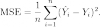
I try to compare several groups to a common control. I have been trying to add a customized algorithm mean squared error (see the image ) into Dunnett Test function but failed.
Can you give me an idea about combining these two algorithm togather?
Here is the mean squared error code:
Function WSFI(ctrlwave, treatwave, xl, xr)
	wave ctrlwave, treatwave  //control waves
	variable xl, xr   // (left and right bracket)

	duplicate/R=(xl, xr)/FREE bw, bdw
	duplicate/R=(xl, xr)/FREE tw, tdw
	MatrixOP/FREE MSE=Sum(magsqr(bdw - tdw))/numPoints(tdw)
	return MSE[0]
End
Here is the DunnettTest function which was written by my boss
Function pksDunnettFn(ctrlWave)
	String ctrlWave
	WAVE M_DunnettTestResults
	WAVE /T T_DunnettDescriptors

	//Prompt ctrlWave,"Select control wave:",popup,WaveList("*",";","")+";_none_"

	String wName, wList, waveLabel, nStars
	Variable j, resultNrows, pValue, qValue, nWaves, totalSamples

	// print ctrlWave

	// compile wave name list from top table: ctrl wave first element
	wList = ctrlWave + ";"
	j = 0
	totalSamples = numpnts($ctrlWave)	// cumulate total # of samples

	do
		wName = WaveName("", j, 1)
		wName = ReplaceString(".d", wName, "")	// strip '.d' from wave names sometimes
		if ( (cmpstr(wName ,"") != 0) && (cmpstr(wName ,ctrlWave) != 0) ) 	// append wave name if not null or ctrlWave name
			wList = wList + wName + ";"
			totalSamples += numpnts($wName)	// cumulate total # of samples
		endif
		j += 1
	while (cmpstr(wName ,"") != 0 )
	nWaves = j-1
	//print nWaves

	print wList

	// do the Dunnett's
	// StatsDunnettTest /ALPH=0.05 /T=1 /WSTR=wList /TAIL=4  /SWN
	StatsDunnettTest /ALPH=0.05 /WSTR=wList /TAIL=4  /SWN

	resultNrows = DimSize(M_DunnettTestResults, 0 )	// # rows in result

	Make /T /O /N=(resultNrows+1, 5) pksDunnettResultTable
	pksDunnettResultTable[0][0] = "CONTROL"
	pksDunnettResultTable[0][1] = "TEST GRP"
	pksDunnettResultTable[0][3] = "CONTROL MEAN"
	pksDunnettResultTable[0][4] = "TEST GRP MEAN"
	pksDunnettResultTable[0][2] = "P VALUE *0.05   **0.01"

	for (j=0; j<resultNrows; j+=1)
		// waveLabel = GetDimLabel(M_DunnettTestResults, 0, j )
		// next test wave
		// wName = StringFromList(j+1, wList)
		waveLabel = T_DunnettDescriptors[j]
		wName = StringFromList(1, ReplaceString(" vs ", waveLabel,";"))

		pValue = M_DunnettTestResults[j][5]
		if (pValue >= 0.05)
			nStars = ""
		elseif (pValue >= 0.01)
			nStars = "*"
		else
			nStars = "**"
		endif

		if ( M_DunnettTestResults[j][4] == 0)
			// print ctrlWave + " vs " + wName + ":  mean " + ctrlWave + " (control) = " + num2str(mean($ctrlWave)) + ", mean " + wName + " = " + num2str(mean($wName)) + ". Means ARE different (P = " + num2str(pValue) + ")" + nStars
		else
			// print ctrlWave + " vs " + wName + ":  mean " + ctrlWave + " (control) = " + num2str(mean($ctrlWave)) + ", mean " + wName + " = " + num2str(mean($wName)) + ". Means are NOT different (P = " + num2str(pValue) + ")"
		endif

		pksDunnettResultTable[j+1][0] = ctrlWave
		pksDunnettResultTable[j+1][3] = num2str(mean($ctrlWave))
		pksDunnettResultTable[j+1][1] = wName
		pksDunnettResultTable[j+1][4] = num2str(mean($wName))
		pksDunnettResultTable[j+1][2] = num2str(pValue) + " " + nStars

	endfor

	print "* = significant at 5% level; ** = significant at 1% level"

	Edit /K=1 /W=(400, 70, 400+600, 300)pksDunnettResultTable as "Dunnett Result Table"
	ModifyTable /Z  width[1]=140, width[2]=140, width[3]=140, showParts=16+32+64

end function
May 6, 2014 at 02:51 pm - Permalink
I am sorry that I did not clarify the goal. Yet you generously gave the best guesses for the goal.
I tried to calculate the mean square error within a range of waves used for Dunnett's test.
I have two groups for Dunnett's test
group 1- control
group 2- different treatments. eg. 5 different waves from 5 different treatments. group2a-2e
I can easily perform Dunnett's test, but I want to add mean square error into it.
At the end, I will have such data of comparison:
group1- group2a = Dunnett's score + mean square error
group1- group2b =Dunnett's score + mean square error
group1- group2c =Dunnett's score + mean square error
group1- group2d =Dunnett's score + mean square error
group1- group2e =Dunnett's score + mean square error
The mean square error which was written here ( the help from IGOR team previously)
xl and xr are the bracket to set the range of wave.
supposedly, ctrlwave is the ctrlwave shares with Dunnett's test; treatwave is the group of 2a-2e.
I tried your suggestion, but failed to compile it with the message saying:
Got "WSFI" instead of string variable or string function name.
Error in Stats:pksDunnettFn
pksDunnettResultTable[j+1][5] = WSFI (cw,ww,xl,xr)
Any clues?
Thank you very much!!
May 9, 2014 at 10:31 am - Permalink
change
to
The former line attempts to assign a numeric value to a text wave. The latter converts the numeric value to a string before doing the assignment.
May 9, 2014 at 12:32 pm - Permalink
Thank you for the input. The error is gone.
I have received another error after running the function.
I got :
Function Execution Error
While executing Make, the following error occurred:
The number of points in wave must be between 0 and 2147 million.
and the table show up with empty value.
....Sot sure where to solve it.
Thank you in advance.
May 9, 2014 at 04:00 pm - Permalink
Read about the debugger:
DisplayHelpTopic "The Debugger"
John Weeks
WaveMetrics, Inc.
support@wavemetrics.com
May 9, 2014 at 04:19 pm - Permalink
The only statement that I can see involving the Make operation is this one
Either use the debugger as John suggests or a print statement to see what value resultNrows is taking on.
The debugger is a very useful tool to have. You should follow John's advice.
May 9, 2014 at 07:36 pm - Permalink