How to set global z range for gizmo image plot?

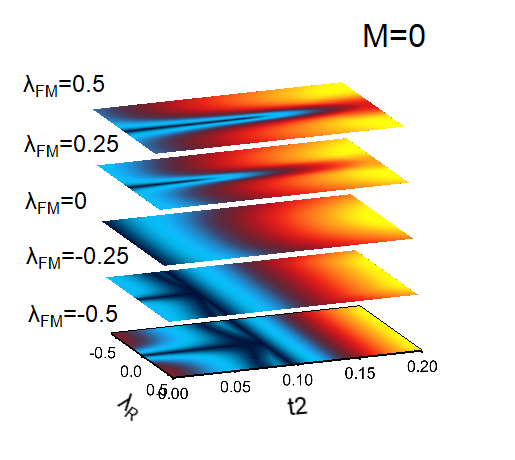
I have a Gizmo plot with stacking of five images. The image colorscale seems to be independent with each other. How to set global z range for Gizmo image plot?

phase diagram

I am guessing that you are using Gizmo Image objects and not Surface objects that are z-slices from some volumetric data.  If that is the case, each Gizmo Image uses a completely independent range for its colorscale that only depends on the range of z-values in the image data.  

One solution that I can think of is for you to create each one of the desired images as an RGB image that has the appropriate colorscale range and then create Gizmo Image objects from the RGB images.  You can create RGB images by displaying the image, modifying its colorscale range saving to disk and then reloading.  You can also do so programmatically.  Here is an example:

•Make/n=(100,200) ddd=20*p/100,eee=20+20*p/100,fff=40+20*p/100
•image2RGB(ddd,0,60)
•image2RGB(eee,0,60)
•image2RGB(fff,0,60)
Function image2RGB(Wave imageData2D,variable globalMin,variable globalMax)
 
    ColorTab2Wave YellowHot256
    Wave M_Colors
    MatrixOP/O M_Colors=uInt8(M_Colors/256)
 
    Variable N=DimSize(M_colors,0)
    Variable rows=DimSize(imageData2D,0)
    Variable cols=DimSize(imageData2D,1)
    Variable pixels=rows*cols
    Variable factor=(N-1)/(globalMax-globalMin)
    Variable row,col,index
    String name=nameofwave(imageData2d)+"_RGB"
    Make/O/N=(rows,cols,3)/u/b $name
    Wave myRGBImagewave=$name
    for(row=0;row<rows;row+=1)
        for(col=0;col<cols;col+=1)
            index=trunc(factor*(imageData2D[row][col]-globalMin))
            myRGBImagewave[row][col][0]=M_Colors[index][0]
            myRGBImagewave[row][col][1]=M_Colors[index][1]
            myRGBImagewave[row][col][2]=M_Colors[index][2]
        endfor
    endfor
End

The Gizmo recreation macro is:

Window gizmo0() : GizmoPlot
    PauseUpdate; Silent 1       // building window...
    // Building Gizmo 9 window...
    NewGizmo/W=(26.25,50,412.5,395)
    ModifyGizmo startRecMacro=1001
    ModifyGizmo scalingOption=63
    AppendToGizmo Axes=boxAxes,name=axes0
    ModifyGizmo ModifyObject=axes0,objectType=Axes,property={-1,axisScalingMode,1}
    ModifyGizmo modifyObject=axes0,objectType=Axes,property={-1,Clipped,0}
    AppendToGizmo Image=root:ddd_RGB,name=image0
    ModifyGizmo ModifyObject=image0,objectType=image,property={ srcType,2}
    ModifyGizmo ModifyObject=image0,objectType=image,property={ colorType,0}
    ModifyGizmo ModifyObject=image0,objectType=image,property={ translationType,1}
    ModifyGizmo ModifyObject=image0,objectType=image,property={ translate,0,0,-1}
    ModifyGizmo ModifyObject=image0,objectType=image,property={ dataMatch,1}
    AppendToGizmo Image=root:eee_RGB,name=image1
    ModifyGizmo ModifyObject=image1,objectType=image,property={ srcType,2}
    ModifyGizmo ModifyObject=image1,objectType=image,property={ colorType,0}
    ModifyGizmo ModifyObject=image1,objectType=image,property={ translationType,1}
    ModifyGizmo ModifyObject=image1,objectType=image,property={ translate,0,0,0}
    ModifyGizmo ModifyObject=image1,objectType=image,property={ dataMatch,1}
    AppendToGizmo Image=root:fff_RGB,name=image2
    ModifyGizmo ModifyObject=image2,objectType=image,property={ srcType,2}
    ModifyGizmo ModifyObject=image2,objectType=image,property={ colorType,0}
    ModifyGizmo ModifyObject=image2,objectType=image,property={ translationType,1}
    ModifyGizmo ModifyObject=image2,objectType=image,property={ translate,0,0,1}
    ModifyGizmo ModifyObject=image2,objectType=image,property={ dataMatch,1}
    ModifyGizmo setDisplayList=0, object=axes0
    ModifyGizmo setDisplayList=1, object=image0
    ModifyGizmo setDisplayList=2, object=image1
    ModifyGizmo setDisplayList=3, object=image2
    ModifyGizmo autoscaling=1
    ModifyGizmo currentGroupObject=""
    ModifyGizmo showInfo
    ModifyGizmo infoWindow={555,11,1380,313}
    ModifyGizmo showAxisCue=1
    ModifyGizmo SETQUATERNION={0.575342,-0.001129,-0.150273,0.803990}
    ModifyGizmo endRecMacro
EndMacro

I hope this helps,

AG