
errorbar in bar graph

Hi,

I try to make bar graph with error bar like attached image.
Error bars placed on the side of bar graph,
and I don't know how to put error bars on the center of each bar.

Could you advice me how to deal with this.

Thanks,
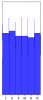
I suspect you have created the plot as an x-y plot (or y - calculated plot), mode=5 (bars), and perhaps with an x-offset=-0.5 to get the axis labels centred?
You can plot the data again (as a dot) and add the error bars to this data to achieve the desired (?) result.
But, I think it is easier by plotting a category plot.

Here is an example of both methods:

Function Test()
	// make some data
	make/O/T wCat={"7","8","9","10","11"}
	make/O wData={10,9,10,11,8}
	make/O wError={2,3,3,1,2}
	
	// category plot
	Display wData vs wCat
	ErrorBars wData Y,wave=(wError,wError)
	
	// bar plot
	Display /W=(312,369.5,706.5,578) wData,wData
	ModifyGraph mode(wData)=5,mode(wData#1)=2
	ModifyGraph hbFill(wData)=4
	ModifyGraph offset(wData)={-0.5,0}
	ErrorBars wData#1 Y,wave=(wError,wError)
End

You can get make a category plot from the user interface using the menu item Windows > New > Category Plot...

Hope this helps,
Kurt
KurtB wrote: I suspect you have created the plot as an x-y plot (or y - calculated plot), mode=5 (bars), and perhaps with an x-offset=-0.5 to get the axis labels centred?
You can plot the data again (as a dot) and add the error bars to this data to achieve the desired (?) result.
But, I think it is easier by plotting a category plot.

Here is an example of both methods:

Function Test()
	// make some data
	make/O/T wCat={"7","8","9","10","11"}
	make/O wData={10,9,10,11,8}
	make/O wError={2,3,3,1,2}
	
	// category plot
	Display wData vs wCat
	ErrorBars wData Y,wave=(wError,wError)
	
	// bar plot
	Display /W=(312,369.5,706.5,578) wData,wData
	ModifyGraph mode(wData)=5,mode(wData#1)=2
	ModifyGraph hbFill(wData)=4
	ModifyGraph offset(wData)={-0.5,0}
	ErrorBars wData#1 Y,wave=(wError,wError)
End

You can get make a category plot from the user interface using the menu item Windows > New > Category Plot...

Hope this helps,
Kurt


Thank you Kurt for your quick response!
I got the graph and could achieve the desired results.

Thank you so much.
