

Image Explorer


Visualization of 3D image stacks
Image Explorer is a data visualization tool for 3D image stacks. It includes tools for navigating and selecting images, signal playback, image contrast controls, max projection, and visualizing time-varying fluorescence data by mousing over different areas of an image stack.
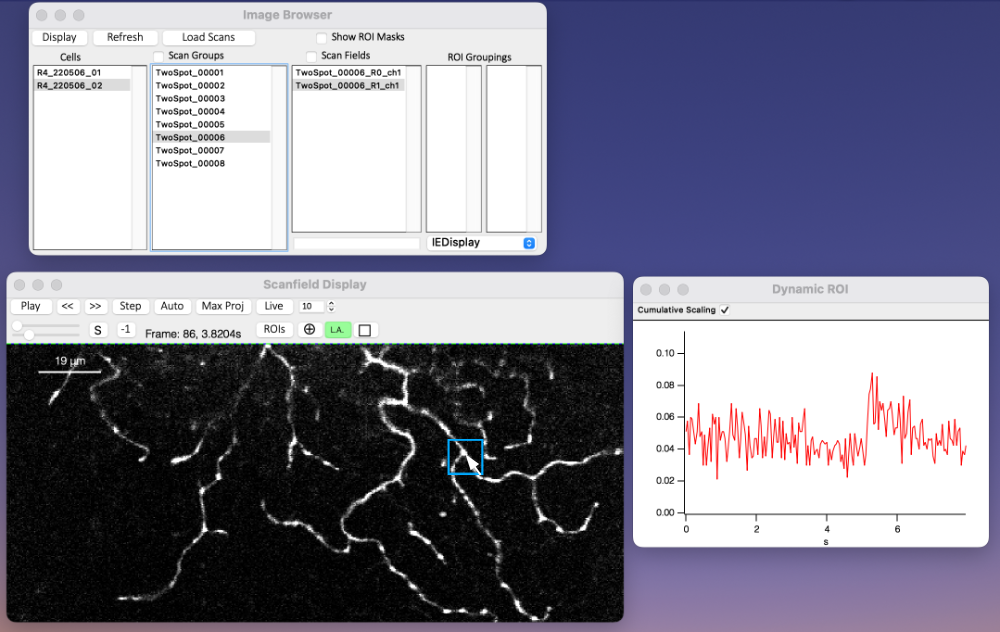
Dynamic ROI
The dynamic ROI tool (engaged by clicking 'Live') allows the user to mouse over XY regions of the image stack to visualize the Z dimension averaged over the indicated area. By increasing or decreasing the size of the ROI (in microns), users can average over larger or smaller areas of the image.
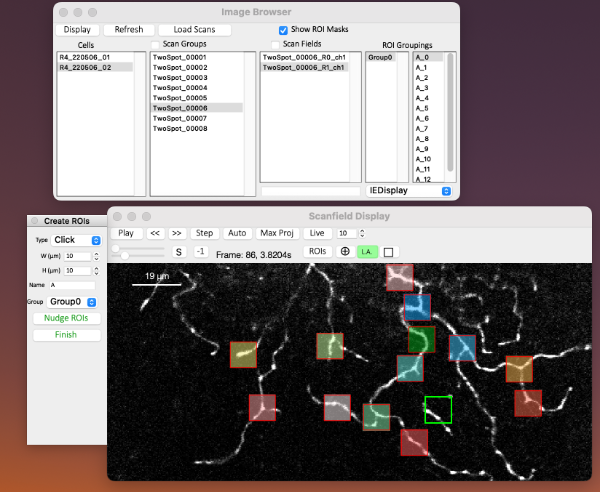
Static ROI Creation
Image Explorer is capable of defining regions of interest (ROI) for further analysis. Currently those ROI boundaries are saved in root:Packages:ImageExplorer:ROIs for the user to then do what they want with them. There are three different ROI creation modes (Marquee, Click, and Draw), and ROIs can be organized into named groups. A drop down menu on the bottom right lists available built-in functions that can act on the selected ROI data. Currently 'Extract ROIs' is the only entry, which extracts the image data along the Z dimension, averaged over the ROI area.
ScanImage Tiffs
Image Explorer includes a loader designed specifically for loading complex .tif formats produced by ScanImage microscopy software. Although only ScanImage files can be loaded, the visualization tools will work on any 3D wave, as long as it is in the expected folder structure within Igor. See the header in the .ipf file for instructions on use, etc.
There are likely some imaging configurations that will fail to load properly; however the following configurations of time-varying frame scans are currently supported:
- Multiple channels
- Multiple scan fields
- Multiple z positions (e.g. using fast-z functionality from an electrically tunable lens (ETL) or a lens with a piezo-electric actuator
- Z stacks with multiple frames per z position
ScanImage interleaves channels, scan fields, and z positions in its .tif specification, so Image Explorer's primary job is to separate that data into multiple output waves for the user.
Using Image Explorer
ImageExplorer.ipf goes in User Procedures or Igor Procedures.
Open Image Explorer through the 'Analysis > Packages > Image Explorer' menu in Igor.
Important note: For the ScanImage loader to be available, you must install the JSON xop provided by byte-physics (https://www.wavemetrics.com/node/20976).
Project Details
Current Project Release
| Release File: | ImageExplorer_v3_0_0.zip (47.77 KB) |
| Version: | v3.0 |
| Version Date: | |
| Version Major: | 3 |
| Version Patch Level: | 0 |

Forum

Support

Gallery
Igor Pro 10
Learn More
Igor XOP Toolkit
Learn More
Igor NIDAQ Tools MX
Learn More
Nice to our JSON XOP being used!
March 1, 2023 at 04:09 am - Permalink