Hi I am really a newer, now I want to create a density contour plot, I want to do like this: first column are the x values, first row are the Y values, and others are the Z values. How to do that?
BTW, if my data for the first column are uneven, then can I create a contour plot yet?
Many thanks!
You will have to extract your X and Y waves out of the matrix and convert them to 1D waves.
Your X and Y waves can be uneven but they must be monotonic.
Here is an example that illustrates what you need to do, if I understood your situation correctly:
Function Test()
	// Make sample data - a 50x50 matrix with X and Y columns at start
	Make/O/N=(51,51) mat
	mat = 3 * exp(-(p-25)^2/400 - (q-25)^2/400)
	mat[][0] = p		// x data
	mat[0][] = q		// y data

	// Extract X data from matrix
	Duplicate/O/R=[0,*][0,0] mat, xData		// Extract column 0
	Redimension /N=(numpnts(xData)) xData	// Convert to 1D

	// Extract X data from matrix
	Duplicate/O/R=[0,0][0,*] mat, yData		// Extract row 0
	Redimension /N=(numpnts(yData)) yData	// Convert to 1D

	// Delete X column
	DeletePoints/M=1 0, 1, mat

	// Delete Y column
	DeletePoints/M=0 0, 1, mat

	// Create a contour plot
	Display;AppendMatrixContour mat vs {xData,yData}
End
By the way, the * in the Duplicate operation means "the last row of the matrix" or "the last column of the matrix." Here is how to read this command:
Duplicate/O/R=[0,*][0,0] mat, xData
"Duplicate mat from row 0 through the last row and from column 0 to column 0 and put the result in xData."



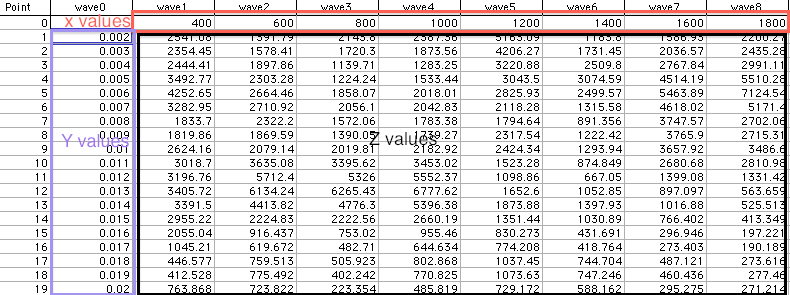


Your X and Y waves can be uneven but they must be monotonic.
Here is an example that illustrates what you need to do, if I understood your situation correctly:
By the way, the * in the Duplicate operation means "the last row of the matrix" or "the last column of the matrix." Here is how to read this command:
"Duplicate mat from row 0 through the last row and from column 0 to column 0 and put the result in xData."
And here is how to read this command:
"Duplicate mat from row 0 through row 0 and from column 0 to the last column and put the result in yData."
You can also use [] to mean "all rows" so this also works:
You can also use [] to mean "all columns" so this also works:
April 21, 2011 at 09:58 pm - Permalink