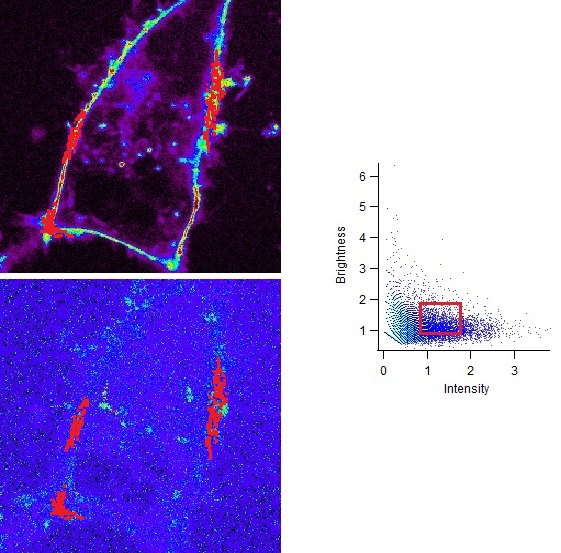
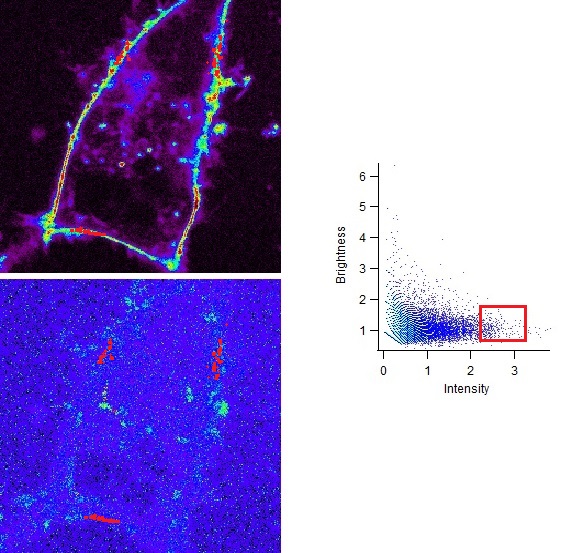
Dynamical correlation between two graphics possible ?

Hello everybody :)

I'm an Igor newbie and I want to duplicate a function of another program (developed in C) in my data analyzing in Igor.

Initialy I have a 256x256 .tiff image.

With simples equations I extract in Igor from this image 2 maps :
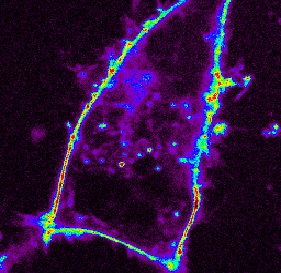
1 map of Itensity and
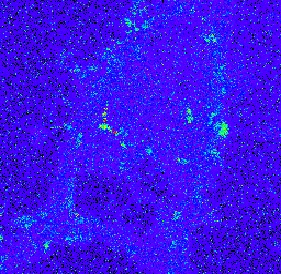
1 map of Brightness.
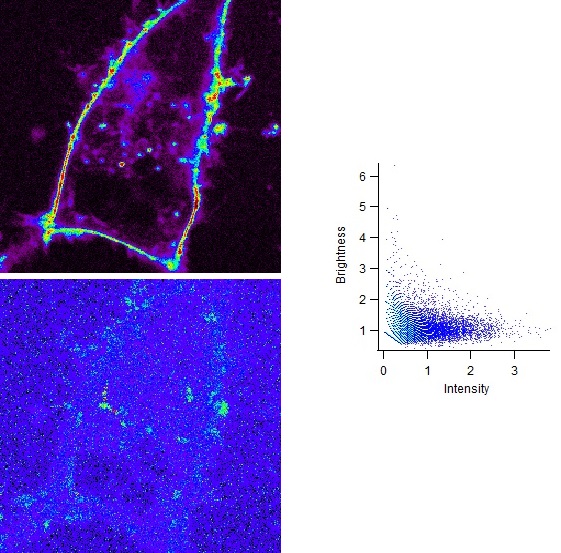
Each of them are 256x256 waves (see attached images) and are displayed in the main window.

I vectorized the maps information (instead of 2D[256][256] waves I create 1D[65536] waves)
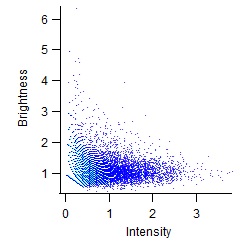
I plot the Brightness vs Intensity for the vectorized maps and I displayed it in the same window.


I want to know if there is a possibility to obtain dynamicaly a visual correlation between a region of the "VerSus graph" and the corresponding pixels in the images of the maps.


The square representation is the ideal display I would want to get but it's not restrictive.


As I don't really know how to ask to Igor to re-lauch a "function" (/proc/macro) each time the mouse is acting in the graphic, the only thing I managed to program is a non-dynamical defininition of a region (with 4 setvariable) and with a "button" to lauch a function.
The function just checks the value of the brightness and of the intensity and creates a mask to change the pixels in red.

It's very time consuming.

Does anyone know if it's possible to ask to Igor to maintain the execution of the program in a "waiting" state in order to lauch a loop when interacting with a graphic ?


Thank you very much

The attached files are :

01 - The Intensity map
02 - The Brightness map
03 - The Brightness versus Intensity graphic extract from the 2 vectorised maps
04 - The display of the window with the 3 elements.
05 - Example number one of the correleation between a defined square of pixels of the Versus Graph and the corresponding pixels in the 2 maps
06 - Same example but with the square moved to the right.
07 - Igor project with the differents waves.
01 - Intensity map.jpg (47.93 KB) 02 - Brightness map.jpg (68.51 KB) 03 - Versus Graphic.jpg (16.99 KB) 04 - Raw Display.jpg (123.78 KB) 05 - Display with the square.jpg (120.87 KB) 06 - Display with the square moved.jpg (120.98 KB) 07 - Simplified experiment.pxp (1.05 MB)
I have code that pretty much does what you want but it is integrated in a larger package and I cannot promise to extract the important bits and pieces in a short amount of time. And it's different in the way that I work with maps containing integers, which has consequences for my approach. That is:

- Redimension both maps from 2D into 1D
- Create a bivariate Histogram (see e.g. http://www.igorexchange.com/node/4651). Here my approach is that the bin size for the histogram is always 1 count (of intensity)
- Plot histogram as NewImage
- Then I use a region of interest (ROI) tool (under image analysis) to select an area on the histogram (see picture), which means creating a mask with 1 for "within the ROI" and 0 for outside
- After multiplication of the mask with the histogram I am left with pairs, say X and Y, of intensities of two elements
- Now the task is to find the pixels in the initial 2D images where X AND Y counts occur. This is simplified by using a Cantor pairing function to generate one unique integer out of two: http://en.wikipedia.org/wiki/Pairing_function
- now the XY pairs from the histogram and the two 2D maps are "cantored"
- then I need to find the correct Cantor values. For this I got input here: http://www.igorexchange.com/node/5447 , although my final version differs from what I wrote back there

All this is implemented in a graphical user interface (see image). The visualisation of the pixels is executed when clicking the "Get Pixels" button. Initially I wanted this automatically to run once the polygon from the ROI action closes, but I didn't find a way to do that.

Hope this gives you an idea but maybe there are better ways.
IntensityMap.png (81.2 KB)
Hello,

Thank you for your answer.

If I understand well, you are suggesting to transform my "versus graphic" into an image in order to "Cantor pairing" the pixels.

My little problem with this option is that the rest of my program is interacting with the data inside the "versus graphic" and I want to keep it dynamically updated when changing parameters (Threshold of intensity and brightness for example).

* The correlation between the pixels of the "maps images" and the pixels of my "versus graphic" is obvious in my case :
each pixel of the map has a [i][j] coordinate (256x256).
In the "Versus graphic" made from the vectorized maps each point has an index between 0 and 65536.
I can extract the coordinate in [i][j] of each point of my "versus graphic" doing this : [i] = floor (index/256) and [j] = mod(index, 256)


* If I manage to draw a rectangle in this graphic, when selecting several point with this rectangle, I will obtain their coordinate in the maps directly with their index.

But I don't know how to draw a rectangle in my "versus graphic" (and I don't know if it's possible) without changing it into image (to keep the live update I need). Moreover, I don't know how to identify the points selected in the graphic (like the masqueetomask tool which creates a mask with 0 and 1).


I'll keep going to find a solution and I'll try to adapt yours but, even if your work seems very close to mine, I'm not sure it will fit with my needs.

Thank you again :)
Djebulon wrote:
If I understand well, you are suggesting to transform my "versus graphic" into an image in order to "Cantor pairing" the pixels.
My little problem with this option is that the rest of my program is interacting with the data inside the "versus graphic" and I want to keep it dynamically updated when changing parameters (Threshold of intensity and brightness for example).


Looking closer at your data it is probably not possible to easily adapt my approach to your data. The pairing works for integers, which in my case typically are between 0 and a few hundred (max) for both input images. The main advantage is to speed up the look-up process to find the desired pixel coordinates. The above approach is virtually instant for images up to 512*384 pixels (larger not tested). For me it is important to have the density plots because I'm looking for distinct populations with high pixel abundances of count pairs.


Djebulon wrote:
But I don't know how to draw a rectangle in my "versus graphic" (and I don't know if it's possible) without changing it into image (to keep the live update I need). Moreover, I don't know how to identify the points selected in the graphic (like the masqueetomask tool which creates a mask with 0 and 1).


This you can do using
FindPointsInPoly
and
GraphWaveDraw
, which can be used to achieve pretty much the same as the ROI mask does on the 2D histogram.


Thank you very much for these 2 functions.

I will try to see if I can adapt them to my problem but they seem promissing.
Well, here is the piece of code that finds the pixels. This assumes that the histogram and the ROI mask already exist. Maybe you can modify it to fit your needs.


function/WAVE  PixFromHistogram(xw, yw, M_Hist, M_ROIMask)   
	wave xw, yw, M_Hist, M_ROIMask

	variable rows = DimSize(xw, 0)
	variable cols = DimSize(xw, 1)	
	
	// Set pixels outside ROI to zero
	MatrixOP/FREE/O M_PixHistROI = M_Hist * M_ROIMask
	
	// convert ROI and histogram information into into 1D waves, keep index information on intensity	
        variable rowsHist = DimSize(M_PixHistROI , 0)
	variable colsHist = DimSize(M_PixHistROI , 1)
	Make/FREE/O/N=(rowsHist * colsHist) nPix, countsX, countsY
	Multithread nPix = M_PixHistROI[p]
	Multithread countsY= floor(p / rowsHist )
	Multithread countsX = mod(p, rowsHist)	
	sort nPix, nPix, countsX, CountsY
	
	// condese waves to rows that contain pixels
	Multithread nPix = nPix == 0 ? NaN : nPix
	variable MinCount = WaveMin(nPix)
	Findlevel/P/Q nPix, MinCount
	DeletePoints 0, (V_LevelX), nPix, countsX, countsY 	
	
	variable nXYpairs = numPnts(nPix)
	
	// make waves to keep results vom Cantor function
	Make/FREE/O/I/U/N=(nXYPairs) ROISolutions 
	Make/FREE/O/I/U/N=(rows * cols)  MapSolutions
	
	// make unique integers using cantor pairing function
	MultiThread ROISolutions = Cantor(countsX[p], countsY[p])
	MultiThread MapSolutions = Cantor(xw[p], yw[p])
	
	// Make result wave unsigned 8 bit to make it compatible with ImageMorphology
	Make/O/B/U/N=(rows * cols) M_PixFromDensityPlot = 0  

	// make a point order wave and sort cantor integers 
	Make/FREE/O/N=(numPnts(MapSolutions)) PntOrder = p
	Sort MapSolutions MapSolutions, PntOrder
	Sort ROISolutions ROISolutions


	// clip everything outside the WaveMin(ROIsolutions) to WaveMax(ROIsolutions) range in the map wave
	FindLevel/Q/P MapSolutions,  WaveMin(ROISolutions)
	DeletePoints 0, V_LevelX, MapSolutions, PntOrder	
	FindLevel/Q/P MapSolutions, WaveMax(ROISolutions)+1
	DeletePoints V_LevelX, inf, MapSolutions, PntOrder

	variable np = numpnts(ROISolutions)
	variable length = numpnts(MapSolutions)
	Make/FREE/O/N=(length) tmp=NaN
	

	//Find values from ROI in 1D Cantor wave MapSolutions
	// BinarySearchInterp returns the point number if value is present in a wave or a fractional, interpolated pointnumber if value is not present
	// use Mod(value, 1) to determine whether return value has a remainer when devided by 1   
	Multithread tmp = mod(binarySearchInterp(ROISolutions, MapSolutions[p]), 1) == 0 ? 1 : NaN
	
	// eliminate points in PntOrder which are NaN 
	Multithread PntOrder *= tmp
	WaveTransform zapNaNs PntOrder

	// Fill output wave in 1D with 1 for pixels in ROI
	variable i
	for (i=0; i<numPnts(PntOrder); i+= 1)		
		M_PixFromDensityPlot[PntOrder[i]] = 1 
	endfor
	
	// make 2D image from 1D wave	
	Redimension /N=(rows,cols) M_PixFromDensityPlot
		
	Return M_PixFromDensityPlot
end

ThreadSafe function Cantor(aa, bb)
	variable aa, bb
	
	variable sumTerm  = aa + bb
	return  1/2 * (sumTerm) * (sumTerm + 1) + bb
end


The attached experiment shows an example. Execute

PixFromHistogram(Al, Si, M_Hist, M_ROIMask) 


to get a mask of the pixels of interest.

You can play with different ROI's on the histogram using "Analysis -> Packages -> Image Processing" then "Image -> ROI". Make sure you uncheck "Zero ROI pixels" in the panel.
ShowPixels.pxp (203.14 KB)
Thank you very much for you code !!!

Okay it seems that I have a lot of work to adapt it to my issue :S

But with
 FindPointsInPoly 
and
GraphWaveDraw
and with your code, I will find a way to do it.


I'll let you know when it will be done ...


Thank you again !
Djebulon wrote: ...But I don't know how to draw a rectangle in my "versus graphic" (and I don't know if it's possible) without changing it into image (to keep the live update I need). Moreover, I don't know how to identify the points selected in the graphic (like the masqueetomask tool which creates a mask with 0 and 1).


Have you looked into using the Marquee for this?
Yes and what I wanted to do initially was to draw a rectangle and to be able to drag it with the mouse. (it's possible with the marquee but the rectangle hasn't any interaction with the data stored in waves)
With the marquee option, you can have a rectangle but you just identify the coordinates once. (right clicking and doing marquee2mask)

When it's done, I didn't find a way to shift the rectangle and to act dynamically on the image displaying the identified pixels (when dragging the rectangle)

Djebulon wrote: I didn't find a way to shift the rectangle and to act dynamically on the image displaying the identified pixels (when dragging the rectangle)


I just tried this on my code:


Function HistogramHook(s)
	STRUCT WMWinHookStruct &s
	
	switch(s.eventCode)
		
		case 8: 				
			
		print "modified"
                // run code to save ROI using ImageGenerateROIMask and to extract pixels
		
		break
						
	endswitch
	
	return 0
End


This works kind of dynamically after dragging the ROI and release of the mouse button, not while the ROI is moving. But there are side effects because this action may be triggered by other events than moving the ROI.


Thank you for all your answer !

I managed to get almost what I wanted using a little trick and only buttons.
I don't drag the rectangle but I shift it.

Thank you Chrlie for these 2 functions :
 FindPointsInPoly 
and
 GraphWaveDraw 


-------------------------------------------------------------------------------------------------------------------------------------------------------------
-------------------------------------------------------------------------------------------------------------------------------------------------------------
// Allows the drawing of a polygone inside the Versus Graphic
Function SquareDRAW(Ctrlname) : ButtonControl
	String Ctrlname

	Variable k
	String/G VSGraph
	Variable/G BooleanDraw
	Wave xWavePoly, yWavePoly, W_inPoly, PixelsToEnlight
	
	k=1	
	if (BooleanDraw==1)				// If the SquareDraw button has already been activated 
		DoAlert/T="Warning" 1, "The Polygone has already be drawn ! \r\n Do you want to erase it and draw another one ?"
		if (V_flag==2)
			k=0
		endif
	endif
	
	Switch (k)
		case 1:						// Draw a new polygone
			
			W_inPoly = 0
			PixelsToEnlight = 0
	
			SetDrawLayer/W=Prog_Window#BvsI/K UserBack
			SetDrawLayer/W=Prog_Window#BvsI UserBack
			GraphWaveDraw/W=Prog_Window#BvsI/O yWavePoly, xWavePoly
			
			BooleanDraw = 1
			
			break
		
		case 0:						// Don't draw a new polygone
			
			break
	Endswitch

End	

-------------------------------------------------------------------------------------------------------------------------------------------------------------
-------------------------------------------------------------------------------------------------------------------------------------------------------------
// Identifies the pixels inside polygone of the Versus Graphic	
Function SquareDONE(Ctrlname) : ButtonControl
	String Ctrlname

	Variable i, k
	Variable/G Rows, Columns, BooleanDraw
	Wave xWavePoly, yWavePoly, VInt, VBright, W_inPoly, PixelsToEnlight
	
	k=1
	if (BooleanDraw==0)				// If the SquareDraw button has NOT already been activated 
		DoAlert/T="Warning" 0, "The Polygone has to be drawn first !"
		k=0
	endif
	
	Switch (k)
		case 1:						// Indentifies the pixels inside the drawn polygone
			
			FindPointsInPoly VInt, VBright, xWavePoly, yWavePoly
			GraphNormal/W=Prog_Window#BvsI
	
			For (i=0;(i<(Rows*Columns));i+=1)
		
				if (W_inPoly[i]==1)
					PixelsToEnlight[floor(i/columns)][mod(i, columns)] = 65536
				endif
			Endfor
			BooleanDraw = 0
			
			break
		
		case 0:						// No polygone drawn => no identification
			
			break
	Endswitch
	
End

-------------------------------------------------------------------------------------------------------------------------------------------------------------
-------------------------------------------------------------------------------------------------------------------------------------------------------------
// Displays the selected pixels inside the Intensity map
Function CorrelationON(Ctrlname) : ButtonControl
	String Ctrlname

	Variable k
	Variable/G BooleanCorrel, BooleanDraw
	Wave Intensity, PixelsToEnlight
	
	k=1
	if (BooleanDraw==1)
		SquareDONE(Ctrlname)
	endif
	
	if (BooleanCorrel==1)				// If the CorrelON button has already been activated 
		DoAlert/T="Warning" 0, "Selected pixels have already been displayed !"
		k=0
	endif
	
	Switch (k)
		case 1:						// Creates the matrix of pixels to display and superimposes it on the map
			
			ModifyImage/W=Prog_Window#Map1 Intensity ctab= {0.001,*,Grays,1};DelayUpdate
			ModifyImage/W=Prog_Window#Map1 Intensity minRGB=(52224,52224,52224),maxRGB=0
			AppendImage/W=Prog_Window#Map1 PixelsToEnlight; DelayUpdate
			ModifyImage/W=Prog_Window#Map1 PixelsToEnlight ctab= {0.01,*,CyanMagenta,0};DelayUpdate
			ModifyImage/W=Prog_Window#Map1 PixelsToEnlight minRGB=NaN,maxRGB=0
			
			BooleanCorrel = 1
			
			break
		
		case 0:						// Matrix already displayed
			
			break
	Endswitch
	
End	

-------------------------------------------------------------------------------------------------------------------------------------------------------------
-------------------------------------------------------------------------------------------------------------------------------------------------------------
// Restore the intensity map.
Function CorrelationOFF(Ctrlname) : ButtonControl
	String Ctrlname

	Variable k
	Variable/G BooleanDraw, BooleanCorrel
	Wave Intensity, PixelsToEnlight
	
	k=1
	if (BooleanDraw==1)
		SquareDONE(Ctrlname)
	endif
	
	if (BooleanCorrel==0)				// If the CorrelOFF button has already been activated 
		DoAlert/T="Warning" 0, "Intensity map is already in normal mode"
		k=0
	endif
	
	Switch (k)
		case 1:						// Removes the selected pixels from the intensity map
			
			RemoveImage/W=Prog_Window#Map1 PixelsToEnlight
			ModifyImage/W=Prog_Window#Map1 Intensity  ctab= {*,*,SpectrumBlack,0};DelayUpdate
			ModifyImage/W=Prog_Window#Map1 Intensity minRGB=0,maxRGB=0
	
			BooleanCorrel = 0
			
			break
		
		case 0:						// Selected pixels already removed
			
			break
	Endswitch
	
End	
-------------------------------------------------------------------------------------------------------------------------------------------------------------
-------------------------------------------------------------------------------------------------------------------------------------------------------------


-------------------------------------------------------------------------------------------------------------------------------------------------------------
-------------------------------------------------------------------------------------------------------------------------------------------------------------
Function Left(Ctrlname) : ButtonControl
	String Ctrlname

	Variable i, k
	Variable/G RectRadioVal
	Variable/G BooleanDraw, BooleanCorrel, Xincrement, Rows, Columns
	Wave xWavePoly, yWavePoly, W_inPoly, PixelsToEnlight, VInt, VBright
	
	k=1
	if (BooleanDraw==1)
		DoAlert/T="Warning" 0, "Pixels inside the Polygone have to be identified first with the SquarDONE button"
		k=0
	endif
	if (BooleanCorrel==0)
		DoAlert/T="Warning" 0, "The correlation between Versus graphic and map should be enable first"
		k=0
	endif
	
	Switch (k)
		case 1:						// translate the polygone to the left
	
			If (RectRadioVal ==1)								// Rectangle shift selected
			
				For (i=0;(i<dimsize(xWavePoly, 0));i+=1)
					xWavePoly[i] = xWavePoly[i] - Xincrement
				Endfor
			Endif
			
			If (RectRadioVal==2)								// Rectangle size increasement selected
				xWavePoly[0] = xWavePoly[0]-Xincrement
				xWavePoly[3] = xWavePoly[3]-Xincrement
				xWavePoly[4] = xWavePoly[4]-Xincrement
			Endif
				
			RemoveImage/W=Prog_Window#Map1 PixelsToEnlight
			PixelsToEnlight = 0
			W_inPoly = 0
			FindPointsInPoly VInt, VBright, xWavePoly, yWavePoly
			
			For (i=0;(i<(Rows*Columns));i+=1)
				if (W_inPoly[i]==1)
					PixelsToEnlight[floor(i/columns)][mod(i, columns)] = 65536
				endif
			Endfor
		
			AppendImage/W=Prog_Window#Map1 PixelsToEnlight; DelayUpdate
			ModifyImage/W=Prog_Window#Map1 PixelsToEnlight ctab= {0.01,*,CyanMagenta,0};DelayUpdate
			ModifyImage/W=Prog_Window#Map1 PixelsToEnlight minRGB=NaN,maxRGB=0
		
			break
	
		case 0:						// No translation due to inactivation of Square or Correlation
		
			break
	Endswitch
	
		
End	
-------------------------------------------------------------------------------------------------------------------------------------------------------------
-------------------------------------------------------------------------------------------------------------------------------------------------------------


And four buttons and associated functions are created : Left, Right, Up and Down with 2 setvariable : x-increment and y-increment.

If you think you will be intersted in this non-complete method, I can simplify my procedure file and post a saved experiment here with an exemple.