

\hat{x}



Hi,
I try to use a symbols in igot graphs. I want to have a circumflex over some characters, similar what $\hat{x}$ would do in latex. I tried the unicode symbol for hat "-x̂ . It works well inside igor, as you can see in the attached first image, but the letter is corrupted when exporting it to EPS. Please look at the second image.
I am indeed very excited about the Igor Tex support. I tried "\\$WMTEX$\hat{x}\\$/WMTEX$". Unfortunately it does not work either.
Any idea?
Best regards, Joerg.
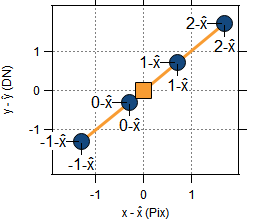
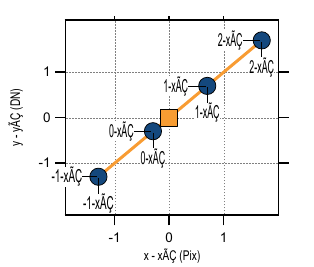
This may depend on the font you use, your operating system and your Igor version, but, in general...
The combining circumflex character is U+0302 in Unicode and "\xCC\x82" in UTF-8.
The garbling you see occurs when you use a character that is not available in the system text encoding (e.g., MacRoman on Macintosh, Windows-1252 on Windows) and you the EPS does not have an embedded outline for the character. This will happen if:
1. The font you use does not support the character
2. The font you use supports the character but it is a "Standard" font and you have not specified to embed it.
So, in this case, I think it should work if you uncheck the "Don't embed standard fonts" checkbox in the Save Graphics dialog.
This works for me in Igor Pro 8 on Macintosh using Helvetica font:
Viewing in Preview, it appears correct, though the circumflex is shifted slightly to the left.
If I execute the same code on Windows and then view it in Preview on Macintosh, I get the right characters but the circumflex is shifted considerably to the right. I got the same shifted result with Helvetica, Arial, Tahoma, and Times New Roman. I also got similar results using Igor PDF. I will bring this up with our graphics expert.
I got good results on Windows using Microsoft Print to PDF, except for Times New Roman where the circumflex was shifted and cut off.
September 14, 2018 at 11:17 am - Permalink
One option is to create the LaTeX representation of the equation externally, save it as an image, and embed it where needed. The good news is that one _can_ include PICTURES in labels and annotations. As my time permits, I might generate an example on macOS using LaTeXiT.
September 15, 2018 at 07:50 am - Permalink
Here is the example. I did this ...
I note, the size of the label picture stays fixed as the graph window size is changed.
Advanced Users: Suppose that you are including the graphic from a PDF into a LaTeX-generated document (i.e. using `\includegraphics{...}`). I might wonder whether the fonts for labels and annotations are accessible (by tikz or whatever). I wonder this because, I have seen a posting on StackExchange that asks specifically how to change fonts on PDF files that are brought into the document.
September 15, 2018 at 09:56 am - Permalink
Hi,
I am on a Win 10 machine. Just for you to know.
Howard's solution worked as soon, as I usde the /EF=2 option in SavePICT/O/E=-3. As Howard wrote, the circumflex is not quite on top of the "x".
I very much like Jeffrey's approch, because once we can include Latex, everything should be possible and appear great. I created the following Latex document
I used
latex.exe -synctex=1 %.texto create DVI anddvips.exe -E -o %.eps %.dvito create EPS. The EPS file has been checked with Inkscape and appears to be ok. Sorry, I cannot provide this EPS file here, because there is no upload for EPS. The EPS has then been loaded to Igor usingThe load appears to have been successful. Igor responds:
But in the dialog window, there is only a gray rectangle with the green text "EPSF". I now use this Picture as bottom label.
The Graph now also shows the green "EPSF" text on gray background as you can see in the attached image.
Again, I am very keen on getting Igor importing Latex pictures. They will resolve a lot. So I really hope we get this running.
Many thanks and best regards,
Joerg.
September 15, 2018 at 11:00 pm - Permalink
Ok. It now seems to work. Thank you for your suggestions!
The imported EPS pict is not visible inside Igor. Once I export the Igor Graph as EPS, it appears correctly inside the EPS file.
Good news: It works. Bad news: It is a nasty workaround, because I cannot see what I do inside of Igor. I always have to export and look up the result in an EPS viewer.
I think, the new Igor inline Latex is absolutely the best possible answer to all similar symbol and formula questions. Please carry on! I really wonder, why we can't have a real latex interpreter inside Igor, which knows all Latex math symbols.
September 16, 2018 at 12:56 am - Permalink
LaTeXiT is yet another reason to use macOS. :-)
Have you considered generating the image as PDF instead of EPS (use pdflatex)?
I had suggested that Igor should call an external LaTeX engine rather than doing all the work itself. One answer in the meantime might be to create a function call such as ...
The function would take a LaTeX string, use ExecuteCommand to call pdflatex with that string, capture the PDF image, and store it in the Igor pictures (optional name [figurename] or default LaTeXImageNNN). The next step would be to manually embed the picture in an annotation or label. Really cool would be when annotations or labels could accept dynamic functions such as DFT (text) or DFP (picture). The annotation or label would be generated by
All that is needed then is for the function convertLaTeX2PDF(...) to return the picture (or a pointer to it as appropriate).
September 16, 2018 at 07:15 am - Permalink
There is also https://www.wavemetrics.com/project/LaTeXPictures which works on both macOS and Windows.
September 16, 2018 at 01:28 pm - Permalink
Yes. Thanks Jim. I had forgotten. The package has a lot to offer!
September 16, 2018 at 04:51 pm - Permalink
Here is proof of concept on macOS that a LaTeX equation can be compiled using a local latex install.
I propose this as a basis for a package with a function that will run LaTeX locally to generate a PDF image of an equation.
September 16, 2018 at 07:54 pm - Permalink
Hi,
here comes my solution. It seems to work quite well. Unfortunately it is a littel complicated, because it contains several workarounds. It takes a latex code argument and converts it to DVI and further on to PNG and EPS. Inside Igor, the PNG is loaded as a picture and enables WYSIWYG operation. The picture call is returned from the function
If the graph is to be saved as EPS, then all previous Latex PNG pictures are reloaded as EPS. This allows proper EPS export. After export, the pictures are again reloaded as PNG to switch back to a WYSIWYG display inside Igor.
Apart from this I like better graphical resolution than 92 dpi. This is why I ask dvipng to do 300 dpi. Unfortunaltely dvipng saves the 300 dpi images as 92 dpi PNG. So I have to load them into Igor, change the resolution, save them back to disk, and then load them as pictures. It would be helpful to have an Igor function, that can turn images to pictures directly.
September 17, 2018 at 06:28 am - Permalink
Nice! I had not built a UI and the save operations around my code. That might come later.
You might try this idea as a substitution ...
This will allow that you can remove the pagestyle and fontsize calls. This will also allow fontsize to be an input variable (i.e. a setvariable on a panel). I would head this way in my next iteration.
Finally, I still am curious why you go through EPS? Why not convert directly to PDF using pdflatex (avoiding the tex -> dvi -> ps -> picture chain)?
September 17, 2018 at 08:08 am - Permalink
Thanks! My code is just a proof of concept. It still needs some error handling in addition.
The "standalone" document class did not work for me in the first place. I have done a Miktex update and then it started working. Now it runs indeed much faster than my "article" document class before. Very good suggestion! Thank you.
I have chosen EPS rather than PDF, because the Igor manual states about importing pictures:
"PDF (Portable Document Format) Supported in Macintosh native graphics only."
I still have to live on Windows.
Do you know, which ams font package to choose inside Latex in order to best meet the Igor standard font? I have tried
The sans serif fonts looks already a bit better than the Igor standard. But it somehow appears a little too large, too wide and too bold. -?
September 17, 2018 at 06:05 pm - Permalink
I have not yet considered how to match fonts. My gut feeling is, this will not be an easy issue to address. Indeed, I wonder if the inverse approach will be easier: set the font in the LaTeX document, then match the font in Igor Pro to it.
I appreciate the clarification on EPS. I had lost track of whether Igor Pro by this time supports PDF across all platforms or not.
September 18, 2018 at 08:16 am - Permalink
I'm not sure why that is relevant since the original post is about exporting, not importing.
September 18, 2018 at 10:19 am - Permalink
We are now working on the import of a picture of an equation. To retain vector graphics, does that not restrict the picture to EPS on Windows?
September 18, 2018 at 11:38 am - Permalink
Let's move this discussion to a new thread.
September 18, 2018 at 12:46 pm - Permalink
In reply to We are now working on the… by jjweimer
hrodsteinIgor (all versions) can not render PostScript, whether in the form of EPS or PDF, on Windows. This is because the Windows OS did not provide support for PDF in the past. (There is support now but I am not sure if it is practical for use by Igor.)
Igor6 on Macintosh and Windows can import an EPS but displays the screen preview, if the EPS has one, not the PostScript.
Based on my testing, Igor7 and later on Macintosh displays the EPS as a gray box even if it has a screen preview, but Igor7 and later on Windows displays the (EMF) screen preview. (The EPS screen preview on Macintosh was PICT and Macintosh no longer supports PICT.)
I don't think there is any vector graphics format that Igor can import that displays correctly in all versions on Macintosh and Windows. The only reliable way to import graphics in all versions on Macintosh and Windows is to use PNG which, of course, is a bitmap format, not a vector format.
For Igor7 or later, SVG is supported on both Macintosh and Windows. Based on brief testing, it seems to work, but I have not tested all combinations of operating system and Igor version.
September 18, 2018 at 12:56 pm - Permalink
In reply to Quote: We are now working… by hrodstein
jjweimerThe PDF "support" on Windows is to display the PDF content as either a bitmap or a DirectXImage. Ugh! Ugh! UGH!
(And developers on macOS think that they have difficulties when they have to deal with differences between using native PDFKit on macOS versus what is implemented in Adobe's version of PDF).
I think this will throw a small proverbial monkey wrench in discussions about using LaTeX in Igor. The caution on Windows will have to be that any LaTeX-generated image posted anywhere in Igor Pro is likely either not going to show at its true resolution on a screen (but it should print at its true resolution) and/or is likely not going to be vector-scalable.
I do not know anything about LaTeX->SVG image to say whether it is doable (or easily doable).
September 18, 2018 at 01:18 pm - Permalink
And be aware that Igor's SVG support is limited to the SVG Tiny spec, so not all SVG can be rendered. There is at least one popular drawing program that produces SVG that is not limited to the Tiny spec.
September 18, 2018 at 05:22 pm - Permalink
Since the screen is a bitmap device, in order to render any graphics on it, the graphics must be converted to a bitmap.
September 18, 2018 at 08:23 pm - Permalink
I just wanted to share my final solution. In most cases it works indeed very fine on Win 10. In rare cases and with errors in the latex formula, the latex background process can suspend and block further batch script executions. Then the process has to be shut down manually in the Windows Task Manager.
I hope, the code is well understandable. I use some of my own library...
September 19, 2018 at 04:56 am - Permalink