

Getting wave reference from WaveSelector Widget?



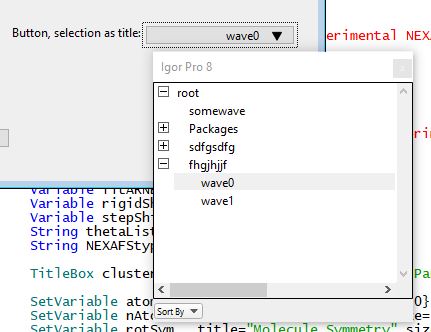
Probably a question that's very easy to answer. I'm making a panel that allows me to run a function I wrote from it instead of using the command line. I have a decent handle on setting up buttons, checkboxes, and Set Variable controls and I've been using them to set up the panel succesfuly so far. It's the first time that I'm trying to use the waveSelectorWidget so I looked at the WaveSelectorWidgetExample.pxp file to try to implement it. I was able to get the WaveSelectorPopUp functionality working onto my panel (i.e. I can click on the button, get the dropdown menu with the different folders, and browse through the data folders to look for and select the wave I want, [picture attached]) however, I'm unsure as to how reference the wave I have selected with the widget.
One of the procedures included in the example "DemoPopupWaveSelectorNotify" , takes the path to the currently selected wave as input and prints it out into the console. I also noticed that the help text associated with the button is also set to the path to the wave which is exactly what I need but I'm unsure as to how to get that.
Any suggestions?
Function panel()
   DoWindow ClusteringAlgorithm
   if(!V_Flag)
        NewPanel/N=ClusteringAlgorithm/W=(50,0,750,700)
        Button PopupWaveSelectorB1,pos={527,544},size={150,20},title="Select A Wave"
        MakeButtonIntoWSPopupButton("ClusteringAlgorithm", "PopupWaveSelectorB1", "DemoPopupWaveSelectorNotify", options=PopupWS_OptionFloat)
        TitleBox WSPopupTitle1,pos={394,544},size={94,20},title="Button, selection as title:"
        TitleBox WSPopupTitle1,frame=0
   endif
End
Thanks!
If you have a string containing a full path to a wave, you can easily get a wave reference like this:
You can read more about this: DisplayHelpTopic "Accessing Global Variables And Waves"
Especially read the subsection "Runtime Lookup of Globals", but don't stop there!
April 10, 2020 at 09:51 am - Permalink
In reply to If you have a string… by johnweeks
vmmr5596Hi John,
I know about obtaining/using wave references that way. I guess I should've been more clear. What I'm unsure about is what $StringWithWavePath would be in WaveSelectorWidgetExample.ipf . I see that the wavepath is passed as an input in this function presented in the example but I'm unsure how to retrieve that value.
I also think that the wavepath is given by the String str in this function but I'm unsure how to retrieve it:
April 10, 2020 at 12:59 pm - Permalink
In reply to Hi John, I know about… by vmmr5596
tonyIf you have this code working so that the function DemoPopupWaveSelectorNotify is reporting the selection, one way to go is to create a package folder and within the DemoPopupWaveSelectorNotify function save the string wavepath as a global string in your package folder that can be retrieved by your code that runs at another time. Is that what you're looking for?
If you want the selection to trigger your code, call your code from within DemoPopupWaveSelectorNotify passing wavepath as a string.
April 10, 2020 at 02:11 pm - Permalink
Hi Tony,
I think that's exactly what I'm looking for. I also figured out a slightly different way just before reading your message.
Basically, if I use :
And then use your suggestion I get the desired outcome.
Thank you!
April 10, 2020 at 02:20 pm - Permalink
Don't use the user data. It is an implementation detail that a future version could change.
You are expected to write your own notify function; it will be called when the user makes a selection from the waveSelectorWidget. In the demo code you are citing, see this:
Note the third quoted string- it names the function to be called. The one in the demo simply prints out the selected wave's path; you would instead write a function that does something with that selection. Usually the notify function itself would do whatever is to be done with the wave, but it's possible you need to stash the string somewhere to be retrieved later, as Tony suggested.
April 10, 2020 at 03:32 pm - Permalink