

Wave Reference in Function Call



Hi,
I have put together a little function to help create box plots. And it seems to do the job nicely.
The idea is that I have a couple of waves, one containing the data and a second containing a text based description.
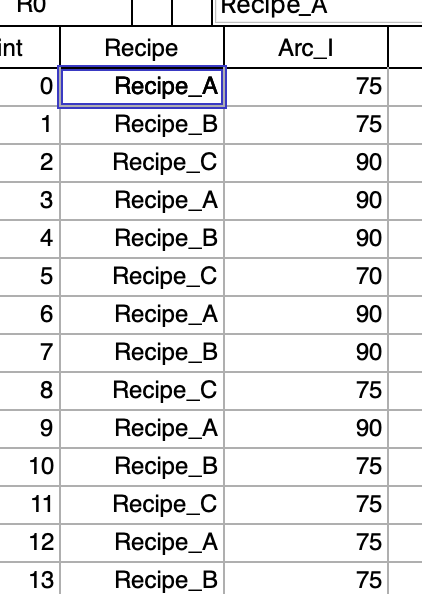 and the idea is to group by the text label and use those labels in a box plot. All good here and now I want to take it to the next level and be able to use a numeric wave as the grouping and label. The example would be if I had an experimental condition in a wave such as a temperature setting. I would like to use the numeric value as an ordinal/nominal value instead of a continuous one. The code to remap from numeric to text is straightforward.
Now the question: I would like to have a single function to call and have the use of a text wave or the needed remapping within the function. In my code the two waves passed by reference include the numeric wave of the data and the second is the labelwave which is now set to text in the declaration. Is it possible to pass a wave reference with declaring the type immediately and then determining the type with in the body of function and proceed accordingly? So I an wondering if I can set the labelwave to be either text or numeric in the pass reference and then use wavetype to decide how it is handled?
Hope that is a clear question.
Andy
Function NewBox(Inwave,LabelWave)
	wave Inwave
	wave/T labelwave

	Findduplicates/FREE /RT=textlabels Labelwave

	variable index,maxindex,points,maxpoints
	maxindex= numpnts(textLabels)

	Make/O /n=(numpnts(Inwave),maxindex) $(nameOfWave(inWave)+"_box")
	Wave results = $(nameOfWave(inWave)+"_box")
	results=NaN
	For(index=0;index<maxindex;index+=1)
		SetDimLabel 1,index,$cleanupName(textlabels[index],0),results
		extract/FREE inWave, tempwave, !cmpstr(labelwave,textlabels[index])
		points = numpnts(tempwave)-1
		results[0,points][index]=tempwave[p]
		maxpoints = max(maxpoints,points)
	endfor
	redimension /N=(maxpoints,-1) results
	Display;AppendBoxPlot/CATL results
end
How about having a text wave with numbers in this case? This way you could pass this into your function without jumping through hoops. A clumsy way to achieve what you want could be to pass the path to your label wave as a string to the function and then do this:
You could then convert the wave to text internally in your function. However, it is not possible to just switch between Wave and Wave/T declarations in the if statement, so it will be fiddly to handle inside the code.
November 14, 2020 at 04:43 pm - Permalink
Hi,
I did really quick test and I think it should work
Andy
November 14, 2020 at 05:39 pm - Permalink
Yes this can be done. The type of the wave is not fixed at compile time. It is a mere hint (yes this is simplified).
The following example illustrates that:
And feeding in some data gives
One noteworthy thing is that we have to declare the wave wvText with /T so that we can read from it into a string. The same approach would work if wave is a wave reference wave or datafolder reference wave.
November 15, 2020 at 07:00 am - Permalink