

Ghost window (procedure window) appears in saved experiments



I'm using the latest Igor 9 on latest macOS (M2 Mac Mini). When I re-open an experiment, the procedure window common to most experiments (a bunch of utility routines for my data analysis) has a ghost window that cannot be closed (see screen capture). It will properly go behind others windows but can't be removed as far as I can tell. Is this a known issue and is there a fix?
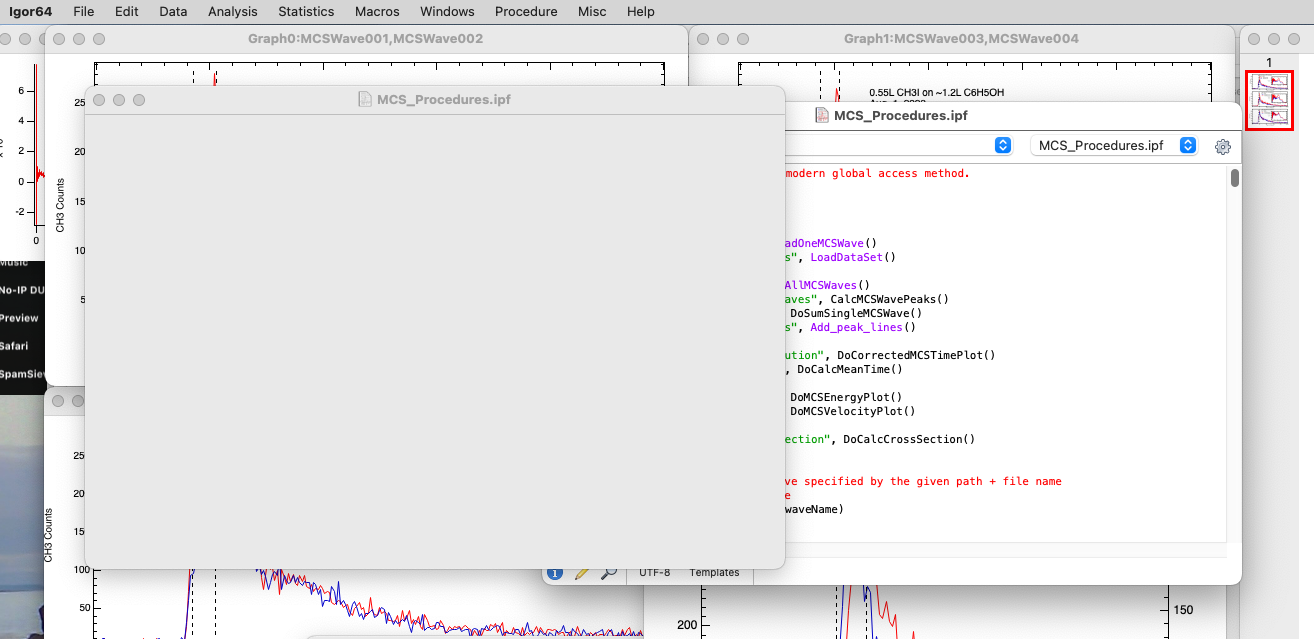
We are unable to reproduce this problem. It would help if you could report this to support@wavemetrics.com. If possible please compress and attach a copy of the experiment in which this happens.
A.G.
August 4, 2023 at 11:44 am - Permalink
This issue was reported to tech support as well. Here is the answer I gave there:
This appears to be a manifestation of a known problem caused by an interaction between the Qt framework and recent versions of Mac OS- if a window is destroyed while docked, it isn't actually destroyed. The Qt parts of the window are destroyed (hence the "ghost" appearance) but the actual Mac OS window is not destroyed. It is this problem that requires the (somewhat annoying) behavior of all your docked windows being un-docked when you shut down Igor. Apparently you have found a corner case not covered by my work-around.
As far as I can tell, the ghost windows don't cause a problem for operation of Igor. I believe if you click the close button, the window will close and no harm is done. This is another case of Apple taking preemptive actions that are hard for small developers to keep up with, especially in an application as large and complicated as Igor.
I see you are using the latest release version of Igor. That gives you the best chance of using Igor on recent Macintosh hardware with few problems. But I urge you read our disclaimers here (it actually applies to any recent version of Mac OS): https://www.wavemetrics.com/faq/igor-pro-macos-1015-catalina-110-big-sur-and-120-monterey. Another problem with Mac OS is covered here: https://www.wavemetrics.com/faq/why-do-i-get-unexpected-results-when-using-igor-pro-7-spaces-macintosh-os-x-0
August 4, 2023 at 08:41 pm - Permalink
In case anyone else still has this issue on macOS, I may have found a way to "fix" it. In those experiments where a ghost window appears, do the following:
* Open the procedure window.
* Option click on the close button for the procedure window.
Viola -- the ghost window is gone too.
This works on macOS 27.2 on an M5 mac with IP 9.05. The fix is however not permanent. The ghost window can reappear the next time you open the experiment. Or not. It seems sometimes that, if you keep the procedure window open as you close the experiment, at the next opening, the ghost is gone.
Perhaps this fix can be offered as a parting retirement gift to John and AG.
--
JJW
November 1, 2026 at 07:08 pm - Permalink