

Multiple lines in tab labels



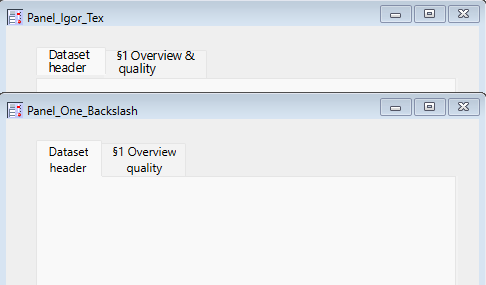
I have a tab control with long labels for the tabs, and I'd like to have the labels split over two lines to save space. However, while I can use carriage returns or newlines in the commands to make the tab, I will get an error when I try to recreate the experiment, since the \r is being interpreted literally and puts carriage return in the command used to recreate the panel.
Window Panel_One_Backslash() : Panel		//Runs fine, but the created panel will cause errors the next time you open Igor
	PauseUpdate; Silent 1		// building window...
	NewPanel /W=(150,269,623,536)
	TabControl tab0,pos={29.00,21.00},size={424.00,227.00}
	TabControl tab0,tabLabel(0)="Dataset\rheader"
	TabControl tab0,tabLabel(1)="§1 Overview\rquality"
	TabControl tab0,value=0
EndMacro

//Macro when you do Ctrl+Y on the panel.  Note the broken lines for the tab labels.
Window Panel_One_Backslash_Recreation_Macro() : Panel
	PauseUpdate; Silent 1		// building window...
	NewPanel /W=(150,570,623,837)
	TabControl tab0,pos={29.00,21.00},size={424.00,227.00}
	TabControl tab0,tabLabel(0)="Dataset
header",tabLabel(1)="§1 Overview
quality"
	TabControl tab0,value=0
EndMacro
If I use \\r, the label only has one line, but will have
I was able to hack it by using Igor Tex, but it took a little fiddling to make it look halfway decent.
Window Panel_Igor_Tex() : Panel
	PauseUpdate; Silent 1		// building window...
	NewPanel /W=(150,269,623,536)
	TabControl tab0,pos={29.00,21.00},size={424.00,227.00}
	TabControl tab0,tabLabel(0)="\JC\Z18\$WMTEX$^{\,\Dataset\,}_{\,\header\,}\$/WMTEX$"
	TabControl tab0,tabLabel(1)="\JC\Z18\$WMTEX$^{\,§1\,\Overview\,&\,}_{\,\,\quality\,}\$/WMTEX$"
	TabControl tab0,value=0
EndMacro
Is there another way to accomplish this? You can have carriage returns in the titles of other controls, like checkboxs, so it would be nice if you can also have carriage returns in the labels for tabs.
I agree that this isn't behaving like it should. I think I've found where the problem is, so I'll put it in for a fix.
August 7, 2026 at 02:34 pm - Permalink
Excellent, thanks!
August 7, 2026 at 05:24 pm - Permalink
This took a bit longer to dial in than I expected, but the fix is in for the next nightly build, which you'll be able to download tomorrow morning. Thanks for the report!
August 18, 2026 at 02:44 pm - Permalink
Thanks for the fix for this. The code needs to work with IP8 and IP9, so I'll leave the Igor Tex for now. One other question: Do you know if there is a way with Igor Tex to make the text bold? I tried the usual LaTeX commands, but they didn't seem to work.
August 26, 2026 at 08:56 am - Permalink
I would be surprised if the basic WMTEX includes any capacity to manage font style. You could make the annotation text as a picture and use \$PICT$name=pictName$/PICT$ as the label.
Be aware that getting text to fit into tab controls can be fraught with issues on macOS with IP 9 (and possibly IP 8). See the image for IP9 on macOS 15.8
Also, the DefaultGUIFont command may be helpful.
August 26, 2026 at 02:00 pm - Permalink
From the DisplayHelpTopic "Fonts Used with Igor TeX" help:
September 3, 2026 at 01:25 pm - Permalink
September 4, 2026 at 07:25 am - Permalink
I played around a bit in the Igor Tex experiment, and while I can change the fonts, the only change I can make to the style is to make letters italic or not. The \rm command works for that, and oddly enough, simply prefacing a word with \ makes just that word not italic, e.g. \$WMTEX$ \test \$/WMTEX$. None of the other LaTeX commands for bold (\bf, \mathbf, \boldmath, \textbf) had an impact, nor did a \f01 tag before or inside the $WMTEX tag. I ended up "solving" this by using different text from what was in the standards document so the tab labels are shorter and fit on one line.
September 4, 2026 at 08:36 am - Permalink