

How to poll all controls when interacting with any control?



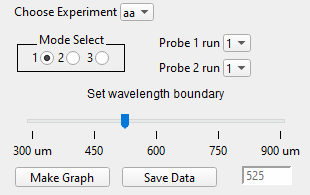
I have a panel that pulls data from about a dozen experiments, each using two probes that have three probe modes and various replicate data files per experiment per mode. The goal is to choose where the wavelength region that each probe is sensitive to overlaps to tease out some fine features of the system. An image of the panel is attached.
The way I understand building panels is that each control has a proc that does a thing based on the control. For example, a slider proc starts out:
Function SliderProc(sa) : SliderControl
	STRUCT WMSliderAction &sa

	switch( sa.eventCode )
		case -3: // Control received keyboard focus
		case -2: // Control lost keyboard focus
		case -1: // Control being killed
			break
		default:
			if( sa.eventCode & 1 ) // value set
				Variable curval = sa.curval
			endif
			break
	endswitch

	return 0
End
and we can do stuff based on the value of the slider by using the variable curval.
Now: looking at my panel, I have four controls that determine which waves get put into the main graph, and one slider control that determines how they're graphed. The specific combination of the three drop-down menus and the radio buttons determines which two waves I use. I would like to update the waves in the graph when any of the controls are interacted with, but I don't know how to access the state of all controls when I can only interact with one control at a time. I'd like to avoid polluting my experiment file with global variables, but I suppose that's one way to accomplish this. Are there better, more robust ways?
You can use the ControlInfo operation to get state of any control. Consider creating one function that is called by your various control specific functions. This "master" function can poll the other controls for their current state and then decide what wave to plot.
April 29, 2025 at 02:40 pm - Permalink
Hi,
You could create a master wave that holds all the values with a function attached to each control to update the particular value when changed. I have always been a big fan/user of dim labels and I could see a 1-D wave with the control name as the dim label and the value stored there. The beauty of this is that you can look at the wave and seen the current values all in one place. Typically I use two waves on for numeric values and the second, a text wave, for strings.
Andy
April 29, 2025 at 03:54 pm - Permalink
Consider the approach below using a Structure. The disadvantage is that any change carries the overhead to query the state of all controls. The advantage is having a "structured" way to retrieve values without using globals.
The expansive approach can be narrowed through selective elimination of what is required as "global" content for any given change in any given control.
Hope this gives you some insights.
April 29, 2025 at 07:40 pm - Permalink