

Small Panel to Set a Graph's Size, Margins, Magnifcation and Font Size

NOTE: A more sophisticated version of this panel can be found in the following project: https://www.wavemetrics.com/node/21562
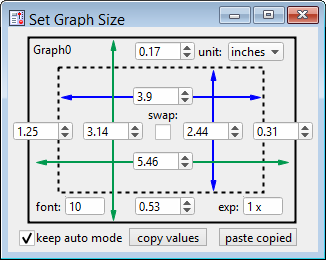
See title. This panel also makes it possible to easily check and change the total graph size (= plot area + margin). Please let me know if you find any bugs or have a suggestion for improvement.
- Start by going to Graph => Graph Size and Margins Panel.
- If you input 0 for a value this size setting will switch back to 'Auto' mode.
UPDATE
- version 1.1: Added buttons to copy & paste all settings between graphs and fine control to the values via up/down arrows.
- version 1.2: Added a checkbox to keep the graph in the Auto scaling mode even after setting a new width or height. Unchecking this box will lock graph into Absolute mode (no manual resizing via dragging) upon changing the size. Locked values are indicated by bold numbers.
#pragma TextEncoding = "UTF-8"
#pragma rtGlobals=3		// Use modern global access method and strict wave access.
#pragma version = 1.22

// https://www.wavemetrics.com/user/chozo
// a small panel to modify a graph's size, margin, font and magnification - ver. 2020-07-10
// always works with the top graph and updates automatically upon activation of the panel

Menu "Graph"
	"Graph Size and Margins Panel ...", /Q, MakeGraphSizePanel()
End
//################################
Function MakeGraphSizePanel()
	if (WinType("GraphSizePanel"))
		DoWindow/F GraphSizePanel
		return 0
	endif
	if (ItemsinList(WinList("*", ";", "WIN:1")) == 0)
		Abort "No graphs available. Create a graph first."
	endif
	NewPanel/K=1/W=(500,60,810,285)/N=GraphSizePanel as "Set Graph Size"
	ModifyPanel /W=GraphSizePanel ,fixedSize= 1 ,noEdit=1
	SetWindow GraphSizePanel hook(UpdateHook)=SizePanelUpdateFunc

	SetDrawLayer UserBack
	SetDrawEnv linethick= 2,fillpat= 0
	DrawRect 20,10,287,195
	SetDrawEnv linethick= 2,dash= 3,fillpat= 0
	DrawRect 50,40,255,165
	SetDrawEnv linethick= 2,linefgc= (0,0,65535),arrow= 3
	DrawLine 53,70,252,70
	SetDrawEnv linethick= 2,linefgc= (0,0,65535),arrow= 3
	DrawLine 205,43,205,163
	SetDrawEnv linethick= 2,linefgc= (1,39321,19939),arrow= 3
	DrawLine 28,135,280,135
	SetDrawEnv linethick= 2,linefgc= (1,39321,19939),arrow= 3
	DrawLine 105,13,105,193

	SetVariable VLeftMargin		,pos={5	,95}	,value=_NUM:0
	SetVariable VBottomMargin		,pos={127	,170}	,value=_NUM:0
	SetVariable VRightMargin		,pos={245	,95}	,value=_NUM:0
	SetVariable VTopMargin			,pos={127	,15}	,value=_NUM:0
	SetVariable VGraphHeight		,pos={75	,95}	,value=_NUM:0
	SetVariable VPlotWidth			,pos={125	,60}	,value=_NUM:0
	SetVariable VGraphWidth		,pos={125	,125}	,value=_NUM:0
	SetVariable VPlotHeight		,pos={175	,95}	,value=_NUM:0
	SetVariable VMagnification	,pos={215	,170}	,value=_NUM:0
	SetVariable VGraphFont			,pos={37	,170}	,value=_NUM:0

	ModifyControlList ControlNameList("GraphSizePanel",";","*")	,limits={0,2000,1}	,size={60.00,18.00} ,bodyWidth=60 ,proc=SizeVarControl

	SetVariable VMagnification	,title="exp:"	,limits={0,8,0} 		,bodyWidth=40	,format="%g x"
	SetVariable VGraphFont			,title="font:"	,limits={0,100,0}	,bodyWidth=40

	TitleBox GraphTitle				,pos={25	,15}	,size={60,23}		,title="none"				,frame=0
	TitleBox SwapTitle				,pos={140	,80}	,size={60,23}		,title="\JCswap:"			,frame=0
	CheckBox SwapAxes				,pos={148	,98}	,size={23,23}		,title=""						,proc=SwapGraphControl ,value=0
	CheckBox KeepAutoMode			,pos={12	,203}	,size={23,23}		,title="keep auto mode"	,value=1	,help={"Automatically resets the mode to Auto after changing the size."}
	PopupMenu SizeUnit				,pos={190	,15}	,size={70,20}		,title="unit: "				,proc=SizePopControl
	PopupMenu SizeUnit				,mode=1			,popvalue="points"	,value= #"\"points;inches;cm\""

	Button CopyAllButton			,pos={120	,200}	,size={85,20}		,title="copy values"		,proc=CopyPasteControl
	Button PasteAllButton			,pos={215	,200}	,size={85,20}		,title="paste copied"		,proc=CopyPasteControl

	FetchLatestGraphSizeValues()
End
//################################
Function SizePopControl(s) : PopupMenuControl
	STRUCT WMPopupAction &s
	if (s.eventCode != 2)
		return 0
	endif
	String CtrlList = ControlNameList("GraphSizePanel",";","V*")
	CtrlList = RemoveFromList("VMagnification;VGraphFont;",CtrlList)
	Variable Increment = 1
	if (s.popNum == 2)		// in inches
		Increment = 0.02
	elseif (s.popNum == 3)	// in cm
		Increment = 0.05
	endif
	ModifyControlList CtrlList ,win=GraphSizePanel	,limits={0,2000,Increment}
	FetchLatestGraphSizeValues()
End
//################################
Function SwapGraphControl(cb) : CheckBoxControl
	STRUCT WMCheckboxAction& cb
	if (cb.eventCode != 2)
		return 0
	endif
	if (ItemsinList(WinList("*", ";", "WIN:1")) == 0)	// make sure there is a graph to work with
		return 0
	endif
	String gName = StringFromList(0,WinList("*", ";", "WIN:1"))
	ModifyGraph/W=$gName swapXY=cb.checked
	FetchLatestGraphSizeValues()
End
//################################
Function CopyPasteControl(s) : ButtonControl
	STRUCT WMButtonAction &s
	if (s.eventCode != 2)
		return 0
	endif

	String CtrlList = "", CtrlName = "", ValList = "", Others
	Variable i, Value = 0
	StrSwitch(s.ctrlName)
		case "CopyAllButton":
			CtrlList = ControlNameList("GraphSizePanel", ";", "V*")
			CtrlList = RemoveFromList("VGraphWidth;VGraphHeight;",CtrlList)
			for (i = 0; i < ItemsInList(CtrlList); i += 1)
				CtrlName = StringFromList(i,CtrlList)
				ControlInfo/W=GraphSizePanel $CtrlName
				ValList += num2str(V_Value) + ";"
			endfor

			Others = ""
			ControlInfo/W=GraphSizePanel SwapAxes
			Others +=  "SwapAxes:" + num2str(V_Value) + ";"
			ControlInfo/W=GraphSizePanel SizeUnit
			Others +=  "SizeUnit:" + num2str(V_Value) + ";"

			SetWindow GraphSizePanel ,userdata(CtrlSet)=CtrlList
			SetWindow GraphSizePanel ,userdata(ValSet)=ValList
			SetWindow GraphSizePanel ,userdata(OtherSet)=Others
		break
		case "PasteAllButton":
			CtrlList	= GetUserData("GraphSizePanel", "", "CtrlSet")
			ValList	= GetUserData("GraphSizePanel", "", "ValSet")
			Others		= GetUserData("GraphSizePanel", "", "OtherSet")
			if (strlen(CtrlList) == 0)
				break
			endif
			CheckBox SwapAxes  ,win=GraphSizePanel	,value=str2num(StringByKey("SwapAxes", Others))
			PopupMenu SizeUnit ,win=GraphSizePanel	,mode=str2num(StringByKey("SizeUnit", Others))
			for (i = 0; i < ItemsInList(CtrlList); i += 1)
				CtrlName = StringFromList(i,CtrlList)
				Value = str2num(StringFromList(i,ValList))
				SetVariable $CtrlName ,win=GraphSizePanel ,value=_NUM:Value
				ExecuteVarChange(CtrlName, Value)
			endfor
		break
	EndSwitch

	FetchLatestGraphSizeValues()
End
//################################
Function SizeVarControl(struct WMSetVariableAction & s) : SetVariableControl
	if (s.eventCode != 1 && s.eventCode != 2)
		return 0
	endif
	ExecuteVarChange(s.ctrlName, s.dval)
End
//################################
Function ExecuteVarChange(String ctrlName, Variable val)
	if (ItemsinList(WinList("*", ";", "WIN:1")) == 0)	// make sure there is a graph to work with
		return 0
	endif
	String gName = StringFromList(0,WinList("*", ";", "WIN:1"))

	Variable Modifier = 1
	ControlInfo/W=GraphSizePanel SizeUnit
	if (V_Value == 2)		// in inches
		Modifier = 72
	elseif (V_Value == 3)	// in cm
		Modifier = 72/2.54
	endif

	ControlInfo/W=GraphSizePanel KeepAutoMode
	Variable Auto = V_Value

	StrSwitch (ctrlName)
		case "VLeftMargin":
			ModifyGraph/W=$gName margin(left) = val*Modifier
		break
		case "VBottomMargin":
			ModifyGraph/W=$gName margin(bottom) = val*Modifier
		break
		case "VRightMargin":
			ModifyGraph/W=$gName margin(right) = val*Modifier
		break
		case "VTopMargin":
			ModifyGraph/W=$gName margin(top) = val*Modifier
		break
		case "VGraphHeight":
			ControlInfo/W=GraphSizePanel VTopMargin
			Variable mTop = V_Value
			ControlInfo/W=GraphSizePanel VBottomMargin
			Variable mBot = V_Value
			Variable pHeight = val-mTop-mBot
			if (val == 0)
				ModifyGraph/W=$gName margin(top) = 0
				ModifyGraph/W=$gName margin(bottom) = 0
				ModifyGraph/W=$gName height = 0
			elseif (pHeight > 0)
				ModifyGraph/W=$gName height = pHeight*Modifier
				if (Auto)
					DoUpdate/W=$gName
					ModifyGraph/W=$gName height = 0
				endif
			endif
		break
		case "VPlotWidth":
			ModifyGraph/W=$gName width = val*Modifier
			if (Auto)
				DoUpdate/W=$gName
				ModifyGraph/W=$gName width = 0
			endif
		break
		case "VGraphWidth":
			ControlInfo/W=GraphSizePanel VLeftMargin
			Variable mLeft = V_Value
			ControlInfo/W=GraphSizePanel VRightMargin
			Variable mRight = V_Value
			Variable pWidth = val-mLeft-mRight
			if (val == 0)
				ModifyGraph/W=$gName margin(left) = 0
				ModifyGraph/W=$gName margin(right) = 0
				ModifyGraph/W=$gName width = 0
			elseif (pWidth > 0)
				ModifyGraph/W=$gName width = pWidth*Modifier
				if (Auto)
					DoUpdate/W=$gName
					ModifyGraph/W=$gName width = 0
				endif
			endif
		break
		case "VPlotHeight":
			ModifyGraph/W=$gName height = val*Modifier
			if (Auto)
				DoUpdate/W=$gName
				ModifyGraph/W=$gName height = 0
			endif
		break
		case "VMagnification":
			Variable Mag = val == 1 ? 0 : val
			ModifyGraph/W=$gName expand = Mag
		break
		case "VGraphFont":
			ModifyGraph/W=$gName gfSize = val
		break
	EndSwitch

	DoUpdate/W=$gName
	FetchLatestGraphSizeValues()
end
//################################ panel update helper function ##################################
Function SizePanelUpdateFunc(s)
	STRUCT WMWinHookStruct &s
	If (s.eventCode == 0)				// Activate
		FetchLatestGraphSizeValues()	// fetch graph properties on panel activation
		return 1
	endif
	return 0								// 0 if nothing done, else 1
End
//################################
Function FetchLatestGraphSizeValues()
	if (ItemsinList(WinList("*", ";", "WIN:1")) == 0)	// make sure there is a graph to work with
		TitleBox GraphTitle ,win=GraphSizePanel ,title="No Graph"
		return 0
	endif
	String gName = StringFromList(0,WinList("*", ";", "WIN:1"))

	Variable Modifier = 1
	ControlInfo/W=GraphSizePanel SizeUnit
	if (V_Value == 2)		// in inches
		Modifier = 1/72
	elseif (V_Value == 3)	// in cm
		Modifier = 2.54/72
	endif

	// values from getwindow (sometimes off by a fraction?)
	GetWindow $gName gsize
	//print V_left, V_right, V_top, V_bottom		// debug
  	Variable gLeft	= V_left
  	Variable gTop	= V_top
  	Variable gWidth	= V_right-V_left
  	Variable gHeight	= V_bottom-V_top
	GetWindow $gName psize
	//print V_left, V_right, V_top, V_bottom		// debug
	Variable mLeft	= round(V_left - gLeft)
	Variable mTop	= round(V_top - gTop)
	Variable mRight	= round(gWidth - V_right)
	Variable mBottom	= round(gHeight - V_bottom)
	Variable pWidth	= round(V_right - V_left)
	Variable pHeight	= round(V_bottom - V_top)
	gHeight	= round(gHeight)
	gWidth		= round(gWidth)

	GetWindow $gName expand
	Variable gMag	= V_Value == 0 ? 1 : V_Value

	// if available, replace with values from recreation macro (these are exact)
	String GraphSettings = GrepList(WinRecreation(gName, 0), "(?i)(height|width|margin|gfsize|swapXY)", 0 , "\r")
	GraphSettings = ReplaceString("\tModifyGraph ",GraphSettings,"")
	GraphSettings = ReplaceString("\r",GraphSettings,",")
	Variable SetmLeft	= str2num(StringByKey("margin(left)", GraphSettings, "=", ","))
	Variable SetmTop		= str2num(StringByKey("margin(top)", GraphSettings, "=", ","))
	Variable SetmRight	= str2num(StringByKey("margin(right)", GraphSettings, "=", ","))
	Variable SetmBottom	= str2num(StringByKey("margin(bottom)", GraphSettings, "=", ","))
	Variable SetpWidth	= str2num(StringByKey("width", GraphSettings, "=", ","))
	Variable SetpHeight	= str2num(StringByKey("height", GraphSettings, "=", ","))
	Variable setgHeight	= SetpHeight + SetmTop + SetmBottom
	Variable setgWidth	= SetpWidth + SetmRight + SetmLeft

	Variable setSwap		= str2num(StringByKey("swapXY", GraphSettings, "=", ","))
	Variable gFont		= str2num(StringByKey("gfSize", GraphSettings, "=", ","))
	setSwap	= numtype(setSwap) == 0 ? setSwap : 0
	gFont		= numtype(gFont) == 0 ? gFont : 10

	mLeft		= numtype(SetmLeft) == 0 ? SetmLeft : mLeft
	mBottom	= numtype(SetmBottom) == 0 ? SetmBottom : mBottom
	mRight		= numtype(SetmRight) == 0 ? SetmRight : mRight
	mTop		= numtype(SetmTop) == 0 ? SetmTop : mTop
	pWidth		= numtype(SetpWidth) == 0 ? SetpWidth : pWidth
	pHeight	= numtype(SetpHeight) == 0 ? SetpHeight : pHeight
	gHeight	= numtype(SetgHeight) == 0 ? SetgHeight : gHeight
	gWidth		= numtype(SetgWidth) == 0 ? SetgWidth : gWidth

	Variable temp = 0
	if (setSwap)		// swap all values
		temp 		= mLeft
		mLeft		= mBottom
		mBottom	= temp
		temp		= mRight
		mRight		= mTop
		mTop		= temp
		temp		= gHeight
		gHeight	= gWidth
		gWidth		= temp
		temp		= pWidth
		pWidth		= pHeight
		pHeight	= temp
	endif

	// recalculate into inch or cm if needed
	if (Modifier != 1)
		mLeft		= round((mLeft*Modifier)*100)/100
		mBottom	= round((mBottom*Modifier)*100)/100
		mRight		= round((mRight*Modifier)*100)/100
		mTop		= round((mTop*Modifier)*100)/100
		gHeight	= round((gHeight*Modifier)*100)/100
		pWidth		= round((pWidth*Modifier)*100)/100
		gWidth		= round((gWidth*Modifier)*100)/100
		pHeight	= round((pHeight*Modifier)*100)/100
	endif

	TitleBox GraphTitle				,win=GraphSizePanel	,title=gName
	CheckBox SwapAxes				,win=GraphSizePanel	,value=setSwap
	SetVariable VLeftMargin		,win=GraphSizePanel	,value=_NUM:mLeft		,fstyle=(numtype(SetmLeft)==0)
	SetVariable VBottomMargin		,win=GraphSizePanel	,value=_NUM:mBottom		,fstyle=(numtype(SetmBottom)==0)
	SetVariable VRightMargin		,win=GraphSizePanel	,value=_NUM:mRight		,fstyle=(numtype(SetmRight)==0)
	SetVariable VTopMargin			,win=GraphSizePanel	,value=_NUM:mTop			,fstyle=(numtype(SetmTop)==0)
	SetVariable VGraphHeight		,win=GraphSizePanel	,value=_NUM:gHeight		,fstyle=(numtype(SetgHeight)==0)
	SetVariable VPlotWidth			,win=GraphSizePanel	,value=_NUM:pWidth		,fstyle=(numtype(SetpWidth)==0)
	SetVariable VGraphWidth		,win=GraphSizePanel	,value=_NUM:gWidth		,fstyle=(numtype(SetgWidth)==0)
	SetVariable VPlotHeight		,win=GraphSizePanel	,value=_NUM:pHeight		,fstyle=(numtype(SetpHeight)==0)
	SetVariable VMagnification	,win=GraphSizePanel	,value=_NUM:gMag
	SetVariable VGraphFont			,win=GraphSizePanel	,value=_NUM:gFont
End

Forum

Support

Gallery
Igor Pro 10
Learn More
Igor XOP Toolkit
Learn More
Igor NIDAQ Tools MX
Learn More
I just had a quick play with this in IP8 on macOS. It works well. Thanks for developing this and sharing. Getting plots looking the same is one thing I always struggle with in Igor, particularly when I have several in a Layout and the y-axes have different numbers of integers.
I tried putting my Graph into a Layout and found that the switch to absolute settings (when changing e.g. vertical plot area, with GraphSizePanel) changes how I normally work with plots in a Layout, but I like the control that this panel gives to the graph window.
July 9, 2020 at 11:33 pm - Permalink
Thank you very much for testing! Great that it seems to work on mac. I updated the panel a bit to include copy and paste buttons, which makes it possible to share the same settings between many graphs easily (something I do very often).
Yes, if you dial in a size it will change to 'Absolute' mode. But you can dial in 0 (zero) for any value to switch back to 'Auto' mode. For example, you could change the plot width/height (blue arrows) and then directly afterwards input in 0. This will leave the size the same, but switches back to Auto for additional adjustments. Note that the margins will change size if you switch to auto unlike the width and height. Do you think it would be useful if you could choose whether or not the mode should switch to Auto after input on its own? Maybe I could add a checkbox for that. By the way if you input 0 for the total graph width/height (green arrows) then both this setting and the margins in this direction reset to Auto mode. This way you get a graph with the correct total size but all other values are freely adjustable.
July 10, 2020 at 01:55 am - Permalink
OK, I went ahead and included a checkbox to keep the graph in Auto scaling mode after making any changes (see version 1.2 above). Obviously, this will not affect the margins, as they will not keep their size.
July 10, 2020 at 04:48 am - Permalink
This is great. The copy/paste works nicely between two windows as I tested it. I think that's a useful addition. Thanks also for adding the checkbox. That definitely helps the way I work with Layouts (maybe this isn't the right way - who knows!). FYI on Mac the text on the "paste copied" button is very slightly clipped but other than that the panel looks good. Thanks!
July 10, 2020 at 07:20 am - Permalink
In reply to I just had a quick play with… by sjr51
@sjr51: In case you don't already know, you can select multiple graphs in a layout and use the Layout main menu to:
If none of those is sufficient maybe you can post an example.
July 10, 2020 at 09:47 am - Permalink
In reply to This is great. The copy… by sjr51
Thanks for the feedback, Stephen. I have slightly increased the button size in version 1.21 to make it fit (hopefully).
@Adam: I think the problem was that my panel was locking the graph into Absolute values, which prevents scaling in the layout. This way, most of the options you have suggested will not work. But that is fixed with the latest version, which leaves the graph in the Auto scaling mode. And yes, I know that you wont really *need* to scale the graphs when working with layouts, but I think there are valid cases (for example, you would like to know where the annotations end up).
July 10, 2020 at 03:42 pm - Permalink
A few thoughts:
* Rather than killing the panel when no graph exists, perhaps just show an alert
* Don't you also need to handle the different Windows / macOS pixel/point conversion factors (96 / 72) for the inches or cm conversions?
* Could the rounding that you do when you work with the m... values be done only until the end?
* I have found it useful to make structure functions as read-from / write-to routines panels, akin to this ...
* In addition to indicating locked values with bold, would it help also to disable the SetVariable?
July 11, 2020 at 05:48 am - Permalink
In reply to A few thoughts: * Rather… by jjweimer
Jeffrey, thank you very much for your suggestions.
OK, there was no particular reason to kill the panel. It can just as well stay open. I have replaced the kill command. Now there is just 'No Graph' displayed. I think an alert or print message will get annoying fast.
Actually, I was not sure about this one. But there was an example in the Igor help somewhere were just 72 was used. Also, the inch values match the ones in the Modify Graph panel here on windows. So I guess its fine as long as no pixels are involved (points != pixels)? Would be great to know for sure, but there is not much I can find about this in the help.
Somehow I need rounding before the values are converted to inches/cm or it will be slightly off from the 'official' values.
Yes, I should use more structures and sub-functions in general. I didn't really make it a habit yet. In this snippet, everything is mostly handled inside the one function FetchLatestGraphSizeValues(). I'm not sure the overhead from structures and sub-functions makes any difference here. I of course am very much open to improve my coding style. If you would like to hack away at the code I'd be interested to see what you would come up with.
This would defeat the point of the panel, no? The values should be always editable to adjust the size settings.
July 11, 2020 at 06:58 pm - Permalink